
Short answer
Zoho Books making tax digital support covers both MTD for VAT, where VAT-registered businesses keep digital records and file VAT returns to HMRC from the software, and MTD for Income Tax, where eligible sole traders send quarterly updates. You authorise Zoho Books with HMRC once, and returns and updates are then submitted directly from your organisation. The software handles the mechanics; getting your tax codes, VAT scheme and bookkeeping right is still your responsibility.
Key takeaways
- MTD for VAT applies to every VAT-registered business, whatever its turnover.
- Income Tax MTD became mandatory from 6 April 2026 for sole traders and landlords with qualifying income over £50,000, with lower thresholds in 2027 and 2028.
- Zoho Books can file VAT returns and, for eligible sole traders, quarterly Income Tax updates directly to HMRC.
- Accrual and cash accounting and the Flat Rate Scheme are configured in the VAT settings.
- Most MTD problems come from poor data (wrong tax codes, unreconciled bank lines), not from the filing step.
Making Tax Digital (MTD) is HMRC’s programme to move tax records and filing into software. For most UK SMEs it now touches two taxes: VAT, and, for sole traders and landlords, Income Tax. This guide explains what each regime asks of you, how Zoho Books handles it, and where businesses tend to trip up.
What is Making Tax Digital, and who does it apply to?
MTD has two parts that matter to Zoho Books users. They cover different people, so it is worth being clear which one applies to you before you change anything in your accounts.
MTD for VAT
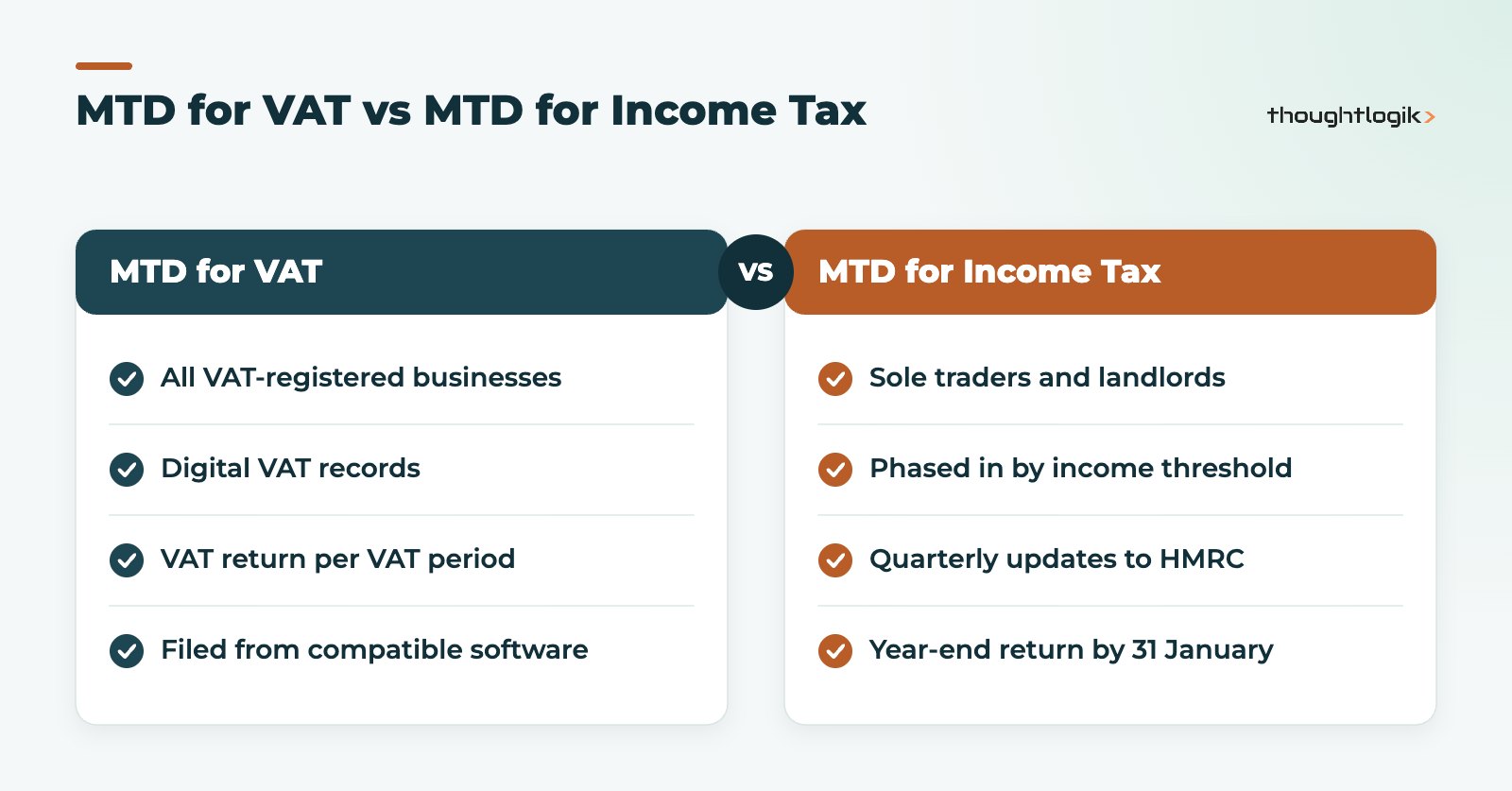
This applies to all VAT-registered businesses, including those that registered voluntarily below the threshold. You must keep VAT records digitally, link any spreadsheets or tools to your filing software digitally (no retyping figures between systems) and submit VAT returns through compatible making tax digital software rather than the old HMRC online form.
MTD for Income Tax
The Income Tax regime applies to individuals registered for Self Assessment who receive self-employment or property income. According to HMRC’s guidance on GOV.UK, it is being phased in by qualifying income:
| Qualifying income | Based on tax year | Mandatory from |
|---|---|---|
| Over £50,000 | 2024 to 2025 | 6 April 2026 |
| Over £30,000 | 2025 to 2026 | 6 April 2027 |
| Over £20,000 | 2026 to 2027 | 6 April 2028 |
Partnerships are expected to follow later, but HMRC has not set a date. Limited companies are not in scope because they pay Corporation Tax, although a director may be in scope personally if they also have their own self-employment or rental income.
How does Zoho Books making tax digital support work?
Zoho Books is cloud making tax digital software from Zoho with a UK edition that includes VAT handling and a direct connection to HMRC. The key idea is that your transactions, VAT calculations and submissions all live in one system, which is exactly what the digital records and digital links rules require.
Filing VAT returns in Zoho Books
In the UK edition, VAT is configured under the VAT settings, where you enter your nine-digit VAT registration number and choose how VAT is calculated. Zoho’s help documentation describes:
- Accrual basis: VAT is calculated from the invoice date.
- Cash basis: VAT is calculated from the date payment is received or made.
- Flat Rate Scheme: you enter your flat rate percentage and the date it applies from.
- Domestic reverse charge handling for eligible transactions, plus options for Northern Ireland trade with the EU.
Once you authorise Zoho Books at HMRC, an organisation admin or an authorised agent can generate the VAT return, review the figures and submit VAT returns electronically. Reviewing before you file is the important part: open each box and check the underlying transactions, particularly anything posted with an unusual tax code.
MTD for Income Tax in Zoho Books
Zoho has added Income Tax features to the UK edition, extending Zoho Books making tax digital support beyond VAT. Zoho states that eligible sole traders can file quarterly updates to HMRC directly from the software, produce a self-employment summary similar to the SA103 formats, and make the year-end submission. Its UK MTD page also describes tracking rental income for landlords. Under the rules, quarterly updates summarise income and expenses for each quarter, and the tax return for the year is still due by 31 January after the tax year ends.
If your situation is more complex, for example several businesses, both trading and property income, or an agent managing your affairs, check with your accountant and Zoho’s current documentation that every part of your case is supported before you rely on it.
Setting up Zoho Books making tax digital for VAT: step by step
For a business already using Zoho Books, switching on MTD is mostly housekeeping, and any compatible making tax digital software needs the same groundwork. The order below avoids the common mistake of connecting to HMRC before the data is right.
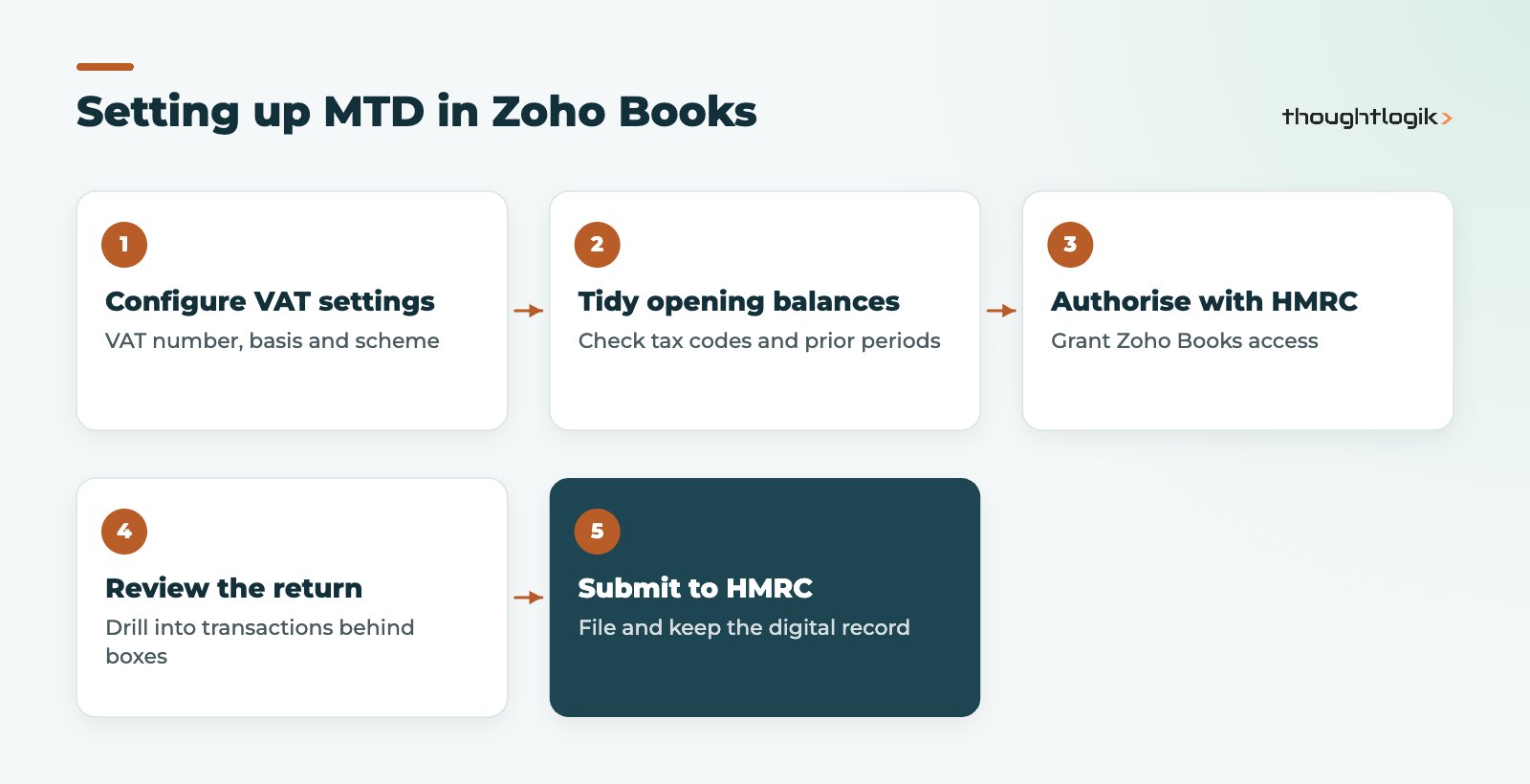
- Confirm your VAT settings. Registration number, accounting basis and any special scheme must match what HMRC holds for you.
- Clean up tax codes. Check items, expense accounts and bank rules default to the correct VAT rates, including zero-rated, exempt and outside the scope.
- Reconcile the bank. Unreconciled or duplicated transactions are the most common reason a VAT return looks wrong.
- Authorise with HMRC. Grant Zoho Books access using the Government Gateway credentials for the business, or let your agent do so.
- Review, then submit. Check the return against your expectations, file it, and keep the submission record.
Is Zoho Books making tax digital support right for your business?
Zoho Books suits many UK SMEs, but whether Zoho Books making tax digital support fits depends on how you work. Consider the points below.
- If you already use other Zoho apps, such as Zoho CRM or Zoho Inventory, Zoho Books sits naturally alongside them, so invoices and stock movements feed your VAT figures without re-keying. Our Zoho Books UK services page covers this in more detail.
- If you are comparing accounting packages, read our guides to Zoho Books vs Xero and Zoho Books vs QuickBooks, which look at UK features side by side.
- If you use Odoo instead, our post on Making Tax Digital in Odoo explains the equivalent setup.
- If you are a sole trader, the Income Tax features matter most; check whether your income is over the threshold that applies to you.
Common Zoho Books making tax digital mistakes
In our experience, filing is rarely the problem. The issues sit upstream:
- Imported history with the wrong tax treatment. After a migration, opening transactions can carry incorrect VAT codes. Check the first return after go-live line by line.
- Spreadsheets in the chain. If you still calculate anything in Excel, the link into Zoho Books must be digital (an import, not retyped numbers) to meet the digital links rules.
- Scheme mismatches. Choosing cash accounting in the software when you are registered on accrual, or vice versa, produces a return that is internally consistent but wrong.
- Lapsed authorisation. HMRC authorisations expire periodically; if a submission fails, reauthorising is usually the first step.
A short Zoho Books making tax digital checklist each quarter, before anyone presses submit, catches most of these issues. Many of our clients pair this with a monthly bank reconciliation so the quarter-end is not a scramble.
How ThoughtLogik helps
We implement and support Zoho Books for UK businesses, with the configuration done around your VAT position, your chart of accounts and the other systems that feed your figures.
- VAT settings, tax codes and scheme set up correctly from day one
- Migration of opening balances and history from your previous package
- Integration with Zoho CRM, Zoho Inventory and other systems via our Zoho integration services
- Ongoing Zoho support for quarter-end questions and HMRC connection issues
Frequently asked questions
Is Zoho Books compatible with MTD for VAT?
Yes. Zoho Books keeps VAT records digitally and lets an admin or authorised agent submit VAT returns to HMRC directly after authorising the software, which is what the VAT rules require.
Does Zoho Books making tax digital support include landlords?
Zoho’s UK making tax digital page describes support for sole traders and for tracking rental income. Check the current documentation and your accountant’s view for your exact mix of income before relying on it.
Do limited companies need MTD for Income Tax?
No. MTD for Income Tax is for individuals with self-employment or property income. A limited company still needs to follow the VAT rules if it is VAT registered.
Can my accountant file through our Zoho Books account?
Zoho’s help documentation says returns can be filed by the organisation admin or an authorised agent, so your accountant can file if they have the right access and HMRC authorisation.
How does the Zoho Books making tax digital link to HMRC work?
You authorise Zoho Books through HMRC’s sign-in process once. The software then uses that permission to submit returns and retrieve obligations until the authorisation needs renewing.
Getting ready for your next VAT quarter? We can review your Zoho Books VAT setup before you file. Book a free consultation or see our Zoho Books UK services.





