
Short answer
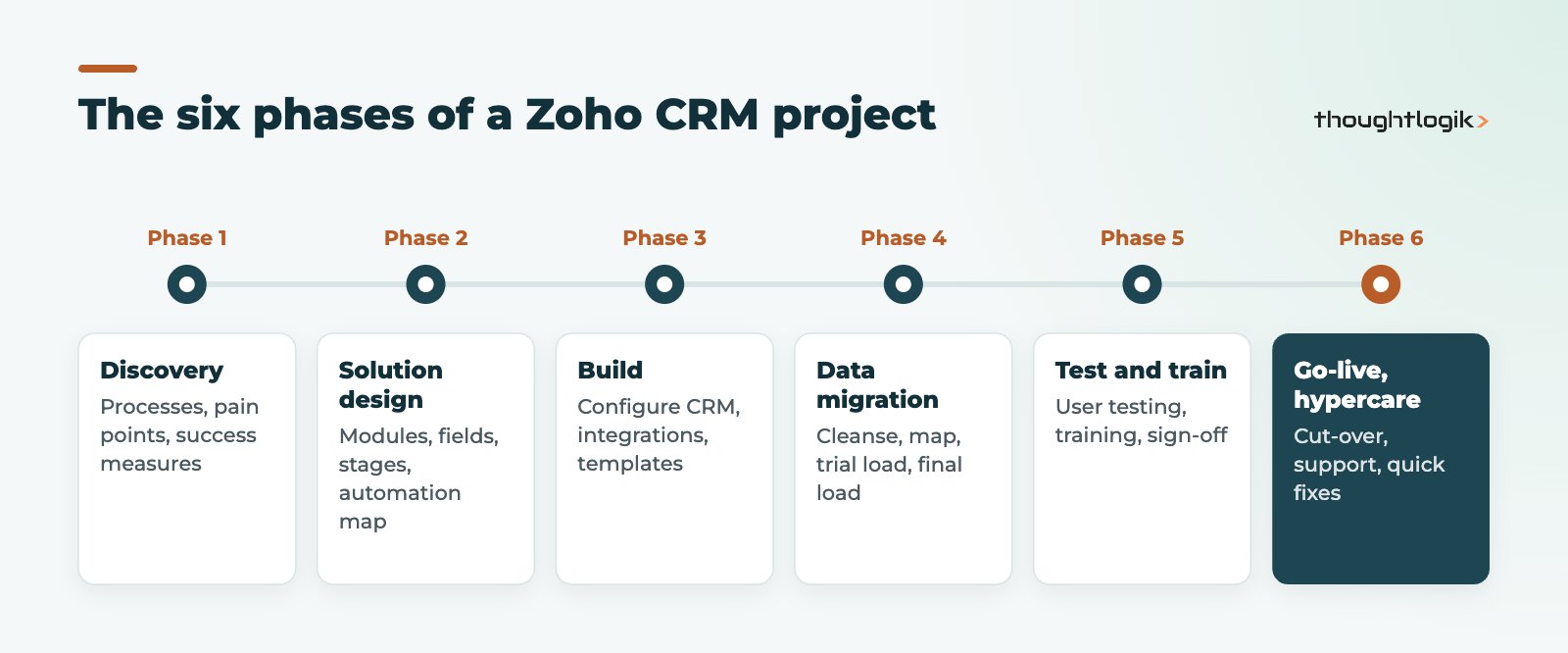
A successful Zoho CRM implementation follows six phases: discovery, solution design, build, data migration, testing and training, then go-live with a period of close support. Most projects that struggle skip discovery or treat data as an afterthought. Use the checklist below to confirm each phase is finished before starting the next.
Key takeaways
- Start with processes and success measures, not with fields and screens.
- Name an internal owner and a CRM administrator before the project starts.
- Plan CRM data migration early: cleansing usually takes longer than loading.
- Test with real users and real scenarios, not only with an admin login.
- Budget time for hypercare after go-live; user adoption is won or lost in the first weeks.
Zoho CRM is quick to switch on, which is part of its appeal. That speed can be misleading: a CRM that is configured before anyone agrees how sales, service and marketing should work tends to end up as an expensive contact list. This crm implementation checklist sets out the phases, roles and decisions that make the difference, based on the projects we deliver for UK SMEs.
What are the phases of a Zoho CRM implementation?
Every business is different, but the shape of a well-run Zoho CRM implementation is consistent. The phases below apply whether you have five users or two hundred; the difference is how much time each one needs.
1. Discovery
Map how leads arrive, how deals progress, who approves discounts, and what happens after a sale. Agree three to five measures of success, such as faster quote turnaround or a reliable pipeline forecast. Collect the reports leadership actually uses today.
2. Solution design
Translate discovery into a design document: modules, key fields, pipeline stages, layouts, roles and profiles, automation, and integrations. Decide which edition you need at this point, because features such as Blueprint, sandbox and portals vary by edition. Our Zoho CRM editions comparison explains the differences.
3. Build
Configure the CRM against the design: fields, layouts, validation, workflow rules, Blueprint processes, email templates and integrations with your finance, marketing or ERP systems. Keep a change log so decisions are traceable. Zoho’s own Zoho CRM getting started documentation is a useful reference for administrators during this phase.
Resist the urge to build everything in one go. Configure the core sales process first, review it with super-users, then layer on automation and integrations. Short review cycles keep the Zoho CRM implementation aligned with how people actually work, and they surface misunderstandings while they are still cheap to fix.
4. Data migration
Extract data from your current system or spreadsheets, cleanse it, map it to the new structure and run a trial import before the final load. Our guide to migrating spreadsheets to Zoho CRM covers this step in detail.
5. Testing and training
Run user acceptance testing with the people who will use the system daily. Train by role, using your own data and scenarios rather than generic demos.
6. Go-live and hypercare
Switch over, make the old system read-only, and keep a small team on hand for the first weeks to fix issues quickly and answer questions.
Who needs to be involved in a Zoho CRM implementation?
Projects fail more often from unclear ownership than from technical problems. These are the roles we ask every client to fill, even if one person covers more than one.
| Role | Responsibility | Typical person |
|---|---|---|
| Executive sponsor | Sets priorities, removes blockers, signs off scope | MD, sales or operations director |
| Project owner | Day-to-day decisions, coordinates internal input | Sales operations or commercial manager |
| CRM administrator | Owns configuration after go-live, handles small changes | Operations analyst or tech-minded team member |
| Super-users | Test, give feedback, support colleagues | One or two per team |
| Implementation partner | Design, build, migration, integrations, training | Zoho partner such as ThoughtLogik |
Zoho CRM implementation checklist by phase
Use this crm implementation checklist as a working document. Nothing moves to the next phase until the items above it are done.
Before your Zoho CRM setup starts
- Business goals and success measures written down and agreed
- Sponsor, project owner and administrator named
- Current processes mapped, including exceptions
- List of systems to integrate (email, telephony, accounting, marketing, website forms)
- Data sources identified, with an owner for each
During design and build
- Pipeline stages defined with clear entry and exit criteria
- Required fields kept to a minimum; every field has a purpose
- Roles, profiles and data sharing agreed, including who can see what
- Automation listed with triggers and owners (see our Zoho CRM workflow rules guide)
- Reports and dashboards defined from the questions leaders ask
CRM data migration checklist
- Duplicates removed and naming conventions agreed
- Field mapping signed off by the project owner
- Trial import checked by users, not only by the project team
- Record counts compared between source and Zoho CRM after the final load
- Attachments, notes and activity history handled or consciously left behind
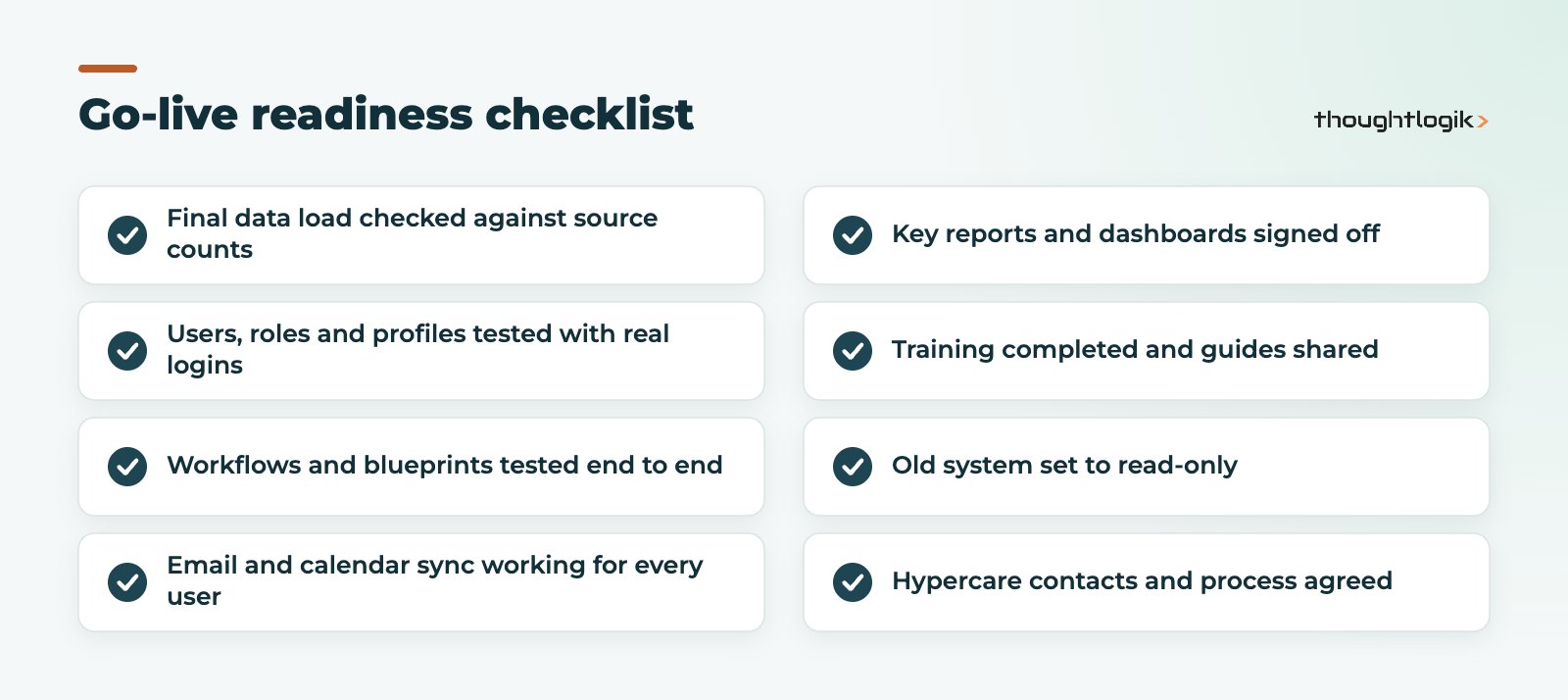
What should be ready before go-live?
Go-live day should be uneventful. If it is not, one of these items was probably skipped.
Common Zoho CRM setup mistakes to avoid
- Copying the old system. Rebuilding every field from a legacy CRM or spreadsheet carries old problems across. Start from the process, not the columns.
- Automating too early. Get the basic process working before adding complex rules. Automation on top of an unclear process produces confusing results.
- Ignoring permissions. Roles and data sharing are harder to change once users are live. Design them early and test with real logins.
- Training once and stopping. User adoption improves when people get short follow-up sessions after they have used the system for a week or two.
- No one owns it afterwards. Without an administrator, small requests pile up and people drift back to spreadsheets.
What does good look like after a Zoho CRM implementation?
Check whether deals are being updated in the CRM rather than elsewhere, whether activities are logged, and whether leadership reviews come from CRM dashboards. If a report still has to be rebuilt in Excel, find out why. Low user adoption is almost always a symptom of a process or design gap rather than a training gap.
A useful habit is a short review at 30, 60 and 90 days after go-live. Look at what users have asked for, which fields are never filled in, and which automations fire more or less often than expected. A Zoho CRM implementation is not finished at go-live: the best systems are refined steadily as the business changes, with the administrator making small, controlled changes rather than occasional large rebuilds. If the CRM has drifted, our Zoho optimisation service can review it.
How ThoughtLogik helps
We are a UK Zoho Premium Partner. Our Zoho implementation services follow the phases in this article, with a named consultant from discovery through hypercare.
- Discovery workshops and a written solution design before any build
- Configuration, automation and Zoho integrations with your existing systems
- Data cleansing and migration from spreadsheets or another CRM
- Role-based training and post go-live support
Frequently asked questions
How long does a Zoho CRM implementation take?
It depends on scope, integrations and data quality. A single-team rollout with clean data is far quicker than a multi-department project with several integrations. Discovery gives you a realistic plan.
Can we do a Zoho CRM implementation ourselves?
Small teams with simple processes often can. Once you need integrations, complex automation or migration from another CRM, a partner usually saves time and rework.
Which Zoho CRM edition should we implement?
Choose the edition in the design phase, based on the features your processes need, such as Blueprint, sandbox or portals. Our editions comparison explains the differences.
What is the biggest risk in a Zoho CRM setup?
Poor data and unclear ownership. Clean data before migration and name an administrator who owns the system after go-live.
Should we migrate all our historical data?
Not always. Migrate what users need to work and report. Older history can often be archived and kept for reference instead.
Planning a Zoho CRM rollout? We can help you scope it properly before you start building. Book a free consultation or see our CRM implementation partner services.





