
Short answer
Odoo MRP is the Manufacturing app in Odoo: it turns bills of materials into manufacturing orders, schedules operations on work centres, consumes components from stock and books finished goods back in. Planning comes from reordering rules or the Master Production Schedule, and operators record progress on the Shop Floor interface. Because it shares a database with Inventory, Purchase, Sales and Accounting, stock and costs update as production happens.
Key takeaways
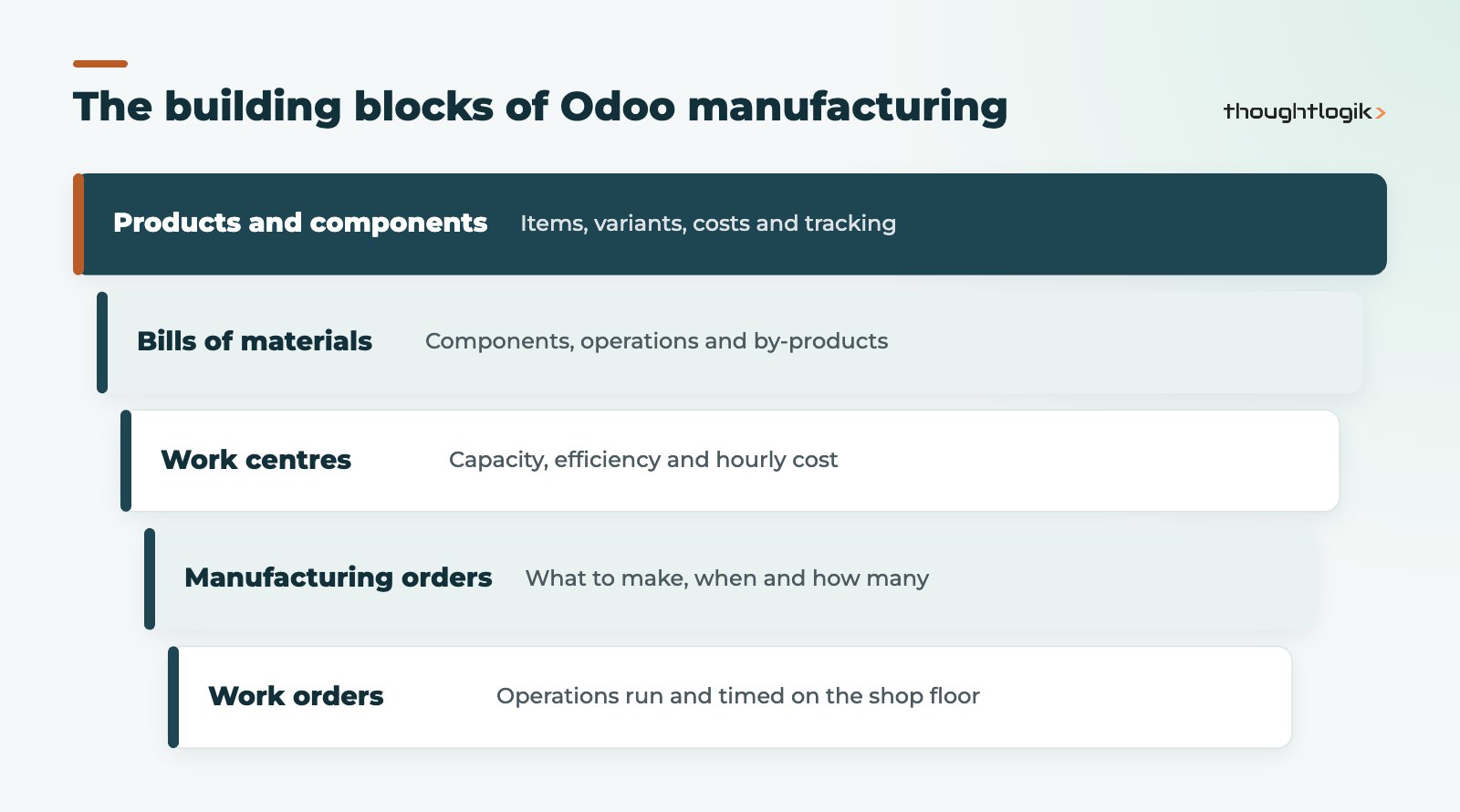
- Bills of materials define components, operations and by-products for each product.
- Work centres hold capacity, efficiency and cost data used for scheduling and costing.
- Warehouses can manufacture in one, two or three steps.
- Use reordering rules or the Master Production Schedule per product, not both.
- Some advanced tools, such as the MPS and Shop Floor, are Odoo Enterprise features.
For UK manufacturers, the appeal of Odoo manufacturing is simple: production, stock, purchasing and finance in one system, rather than a planning spreadsheet next to an accounts package. This guide walks through the building blocks and the decisions that shape a good setup.
What does Odoo MRP cover?
Odoo MRP handles the core of discrete and light process manufacturing. The official Odoo Manufacturing documentation covers each area in detail; in summary it includes:
- Bills of materials, including multi-level BoMs and product variants
- Manufacturing orders created manually, from sales or from replenishment
- Work orders for each operation, with time tracking
- Work centres with capacity and cost data
- By-products, scrap and unbuild orders
- Subcontracting of production to external suppliers
Related apps add Quality checks, Maintenance of equipment and Product Lifecycle Management for engineering changes. See our guides to Odoo quality management and Odoo Maintenance.
How does a bill of materials work in Odoo?
The bill of materials is the recipe. It lists components and quantities to make a set quantity of a finished product, and optionally the operations, by-products and the work centres used. Odoo supports three BoM types:
| BoM type | What happens | Typical use |
|---|---|---|
| Manufacture this product | Creates manufacturing orders that consume components and produce the finished item | Assembled or made products held in stock |
| Kit | Components are picked and shipped as a set; no manufacturing order | Bundles and packs assembled at dispatch |
| Subcontracting | A supplier makes the product, with components resupplied or dropshipped | Outsourced machining, finishing or packing |
Multi-level BoMs and variants
Sub-assemblies have their own BoMs, which Odoo can plan as separate manufacturing orders. For products with variants (size, colour), one BoM can apply component lines to specific variants, which avoids maintaining dozens of near-identical recipes.
Setting up work centres in Odoo MRP
Work centres represent the places where work happens: a machine, a line or an assembly bench. Each records capacity, time efficiency, set-up and clean-up times, and a cost per hour. Operations on the BoM point to a work centre with a default duration, which is how Odoo MRP schedules work orders and calculates labour and machine cost.
Do you need work orders at all?
Not always. Work orders are an option switched on in the Manufacturing settings. A small workshop may only need manufacturing orders that consume components and produce stock. Add work centres and work orders when you need scheduling by resource, time tracking or real production costing.
One, two or three step manufacturing
Each warehouse can manufacture in one step (components consumed from stock and finished goods produced in place), two steps (components picked to a production area first) or three steps (pick components, manufacture, then store finished goods). More steps give tighter control of stock movements but add transfers to process. Our Odoo inventory management guide explains warehouses and routes in more depth.
How does Odoo MRP planning work?
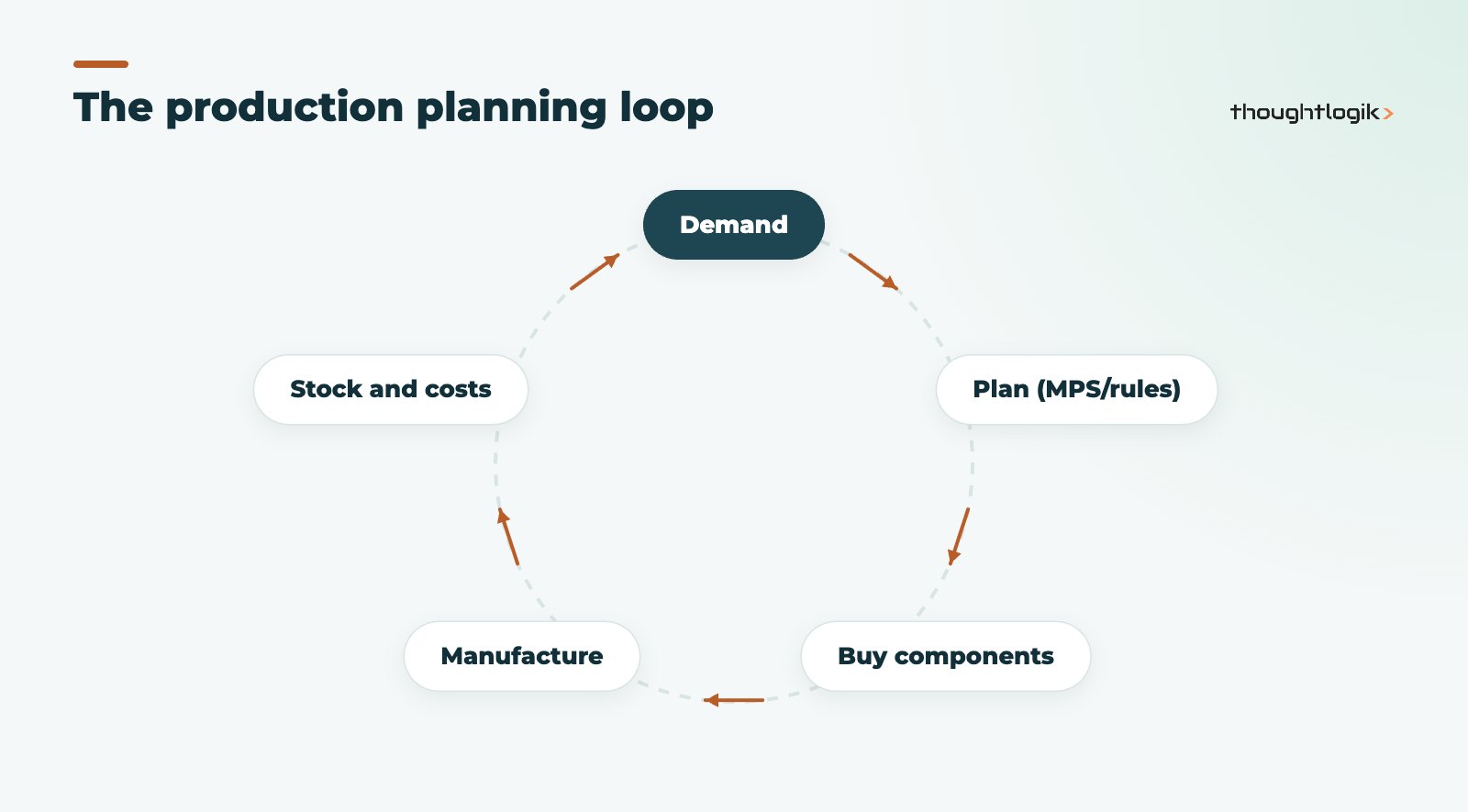
Odoo manufacturing offers two main ways to plan production, and it is best to choose one per product:
- Reordering rules create manufacturing or purchase orders automatically when forecast stock falls below a minimum. They suit steady, repeat items.
- The master production schedule lets a planner set production targets by period against forecast demand, with Odoo suggesting what to make and buy. It suits seasonal products and planned capacity.
Make-to-order routes can also create a manufacturing order directly from a confirmed sales order, which suits bespoke or configured products.
Is the master production schedule in every edition?
The master production schedule, Shop Floor, Quality and PLM are Odoo Enterprise features. Community includes core manufacturing orders and BoMs. Our Community vs Enterprise guide covers the full picture.
Running production on the Shop Floor
The Shop Floor interface is designed for tablets at work centres. Operators see their queue, start and finish work orders, follow worksheets, record quality checks and scrap, and log actual time. That real time feeds costing and efficiency reporting, so planners and finance see what production actually took. Supervisors can spot bottlenecks at a glance, because blocked or late work orders show at the work centre where they sit.
Traceability in Odoo manufacturing
If you track lots or serial numbers, Odoo links finished goods to the component lots consumed, which supports recalls and customer audits. This matters in food, electronics and regulated sectors. Our post on Odoo traceability with lots and serials goes further.
How Odoo MRP connects to costing and accounts
Because manufacturing sits in the same database as Inventory and Accounting, completing a manufacturing order moves components out of stock and the finished product in. With automated (perpetual) inventory valuation, those movements post accounting entries, so work in progress and finished goods values follow production rather than waiting for a month-end journal. The product cost can be built from component costs plus the work centre cost per hour multiplied by operation time.
Two decisions shape how useful this is. First, the costing method on each product category (standard, average or first in first out) decides how component and finished goods values behave. Second, the discipline of recording actual time: if operators never close work orders, the costing uses defaults and variances hide. Agree both with your finance team before go-live.
Common Odoo MRP setup mistakes
- Modelling too much on day one. Detailed routings for every product before the team is used to manufacturing orders slows adoption. Start simple and add detail where it pays.
- BoMs copied from old spreadsheets. Units of measure, scrap allowances and obsolete components need checking before import.
- Two planning methods on one product. Reordering rules and the MPS fighting each other create duplicate orders.
- Ignoring lead times. Supplier and manufacturing lead times drive when Odoo suggests ordering; leave them blank and suggestions arrive too late.
- No stock accuracy. Planning is only as good as the on-hand figures it starts from.
How ThoughtLogik helps
We implement Odoo MRP for UK manufacturers, starting with how you actually make things rather than a template.
- BoM and routing design, including variants and sub-assemblies
- Work centre setup for scheduling and costing
- Planning approach: reordering rules, MPS or make to order
- Shop Floor rollout and operator training
See how we work with manufacturing businesses.
Frequently asked questions
Is Odoo MRP suitable for small manufacturers?
Yes. You can start with BoMs and manufacturing orders only, then add work orders, planning and quality as the business needs them.
Can Odoo manufacturing handle subcontracting?
Yes. A subcontracting BoM lets a supplier make the product, with components resupplied or dropshipped to them.
Does Odoo MRP calculate product cost?
It uses component costs plus work centre costs from operations, and can reflect actual time recorded on work orders.
What is an unbuild order in Odoo manufacturing?
An unbuild order reverses production, returning components to stock from a finished product, for example after a return or a build error.
Should I use reordering rules or the master production schedule?
Use one method per product: reordering rules for steady repeat items, the MPS where a planner manages demand by period.
Planning production in spreadsheets? Let us show you what Odoo manufacturing could do for your shop floor. Book a free consultation or see our Odoo implementation service.





