
Short answer
The Bigin vs Zoho CRM choice comes down to complexity. Bigin by Zoho is a simple, pipeline-centric CRM for small teams moving off spreadsheets, while Zoho CRM is a full, highly customisable platform for businesses with more complex sales, service or approval processes. Start with Bigin if simplicity is the priority; choose Zoho CRM if you already know you need custom processes, deeper automation or integrations.
Key takeaways
- Bigin is designed around pipelines and is quick to adopt.
- Zoho CRM adds custom modules, Blueprint, deeper automation and wider analytics.
- Zoho provides a built-in upgrade from Bigin to Zoho CRM, run by an administrator.
- Pipelines in Bigin become layouts in the Zoho CRM Deals module; sub-pipelines become pipelines.
- Bigin add-ons do not carry over and the Bigin subscription is not cancelled automatically.
Zoho sells two CRMs that look similar at first glance. Bigin by Zoho is aimed at small businesses taking their first step from spreadsheets and inboxes. Zoho CRM is Zoho’s flagship CRM, used from small teams up to large organisations. Choosing well saves you either paying for complexity you do not need or outgrowing your system within a year.
What is the difference in Bigin vs Zoho CRM?
Zoho describes Bigin as a pipeline-centric CRM: everything is organised around pipelines, stages and the deals moving through them. Zoho CRM treats pipelines as one feature among many, alongside leads, accounts, custom modules, process management, inventory features and more.
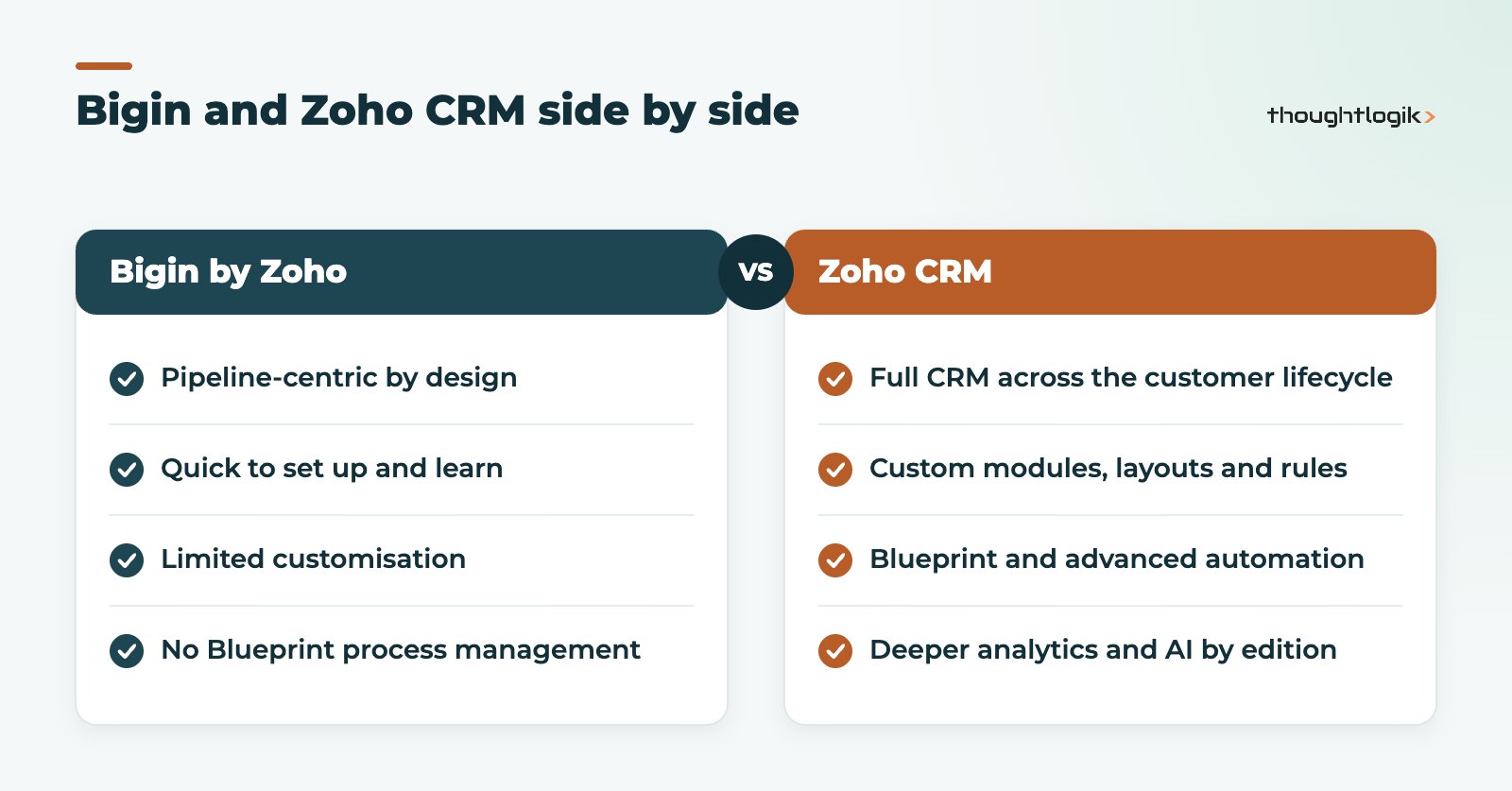
| Area | Bigin by Zoho | Zoho CRM |
|---|---|---|
| Designed for | Small businesses replacing spreadsheets | Growing businesses and larger organisations |
| Structure | Pipelines and sub-pipelines | Leads, contacts, accounts, deals and custom modules |
| Customisation | Custom fields within set limits, no custom modules | Custom modules, layouts, validation and more, by edition |
| Process management | Basic automation rules | Workflow rules, Blueprint and approval processes |
| Reporting | Charts and KPIs | Reports, dashboards, anomaly detection and advanced analytics by edition |
| Learning curve | Low | Moderate, depending on configuration |
Limits also differ. Zoho publishes the details on its Bigin and Zoho CRM comparison page, including custom fields, automation rules and record capacity for each plan.
When is Bigin by Zoho the right small business CRM?
Bigin works well when:
- You have a small team and one or a few straightforward sales processes.
- Your main goal is visibility: what deals are open, where they are, and what happens next.
- You want something people will use from day one with minimal training.
- You do not need complex approvals, quotes and orders in the CRM, or heavy integrations.
For a trades business, a small agency or a consultancy, Bigin is often a sensible small business CRM. It keeps the discipline of a CRM without the setup effort. Our Bigin by Zoho UK page covers how we set it up for clients.
Bigin vs Zoho CRM: when should you choose Zoho CRM instead?
Go straight to Zoho CRM if any of these already apply:
- You need to track things beyond deals, such as projects, assets, applications or properties, which calls for custom modules.
- Your process has mandatory steps, approvals or hand-offs between teams, which Blueprint handles well.
- You want to quote, raise sales orders or manage products inside the CRM.
- You need integrations with accounting, ERP, telephony or marketing systems beyond simple connections.
- Leadership needs forecasting and reporting across teams.
In the Bigin vs Zoho CRM decision, the cost of switching later is worth weighing. If you can see these needs coming within a year, starting on Zoho CRM usually avoids a second implementation. Our Zoho CRM editions comparison helps you pick the right tier.
How do you upgrade from Bigin to Zoho CRM?
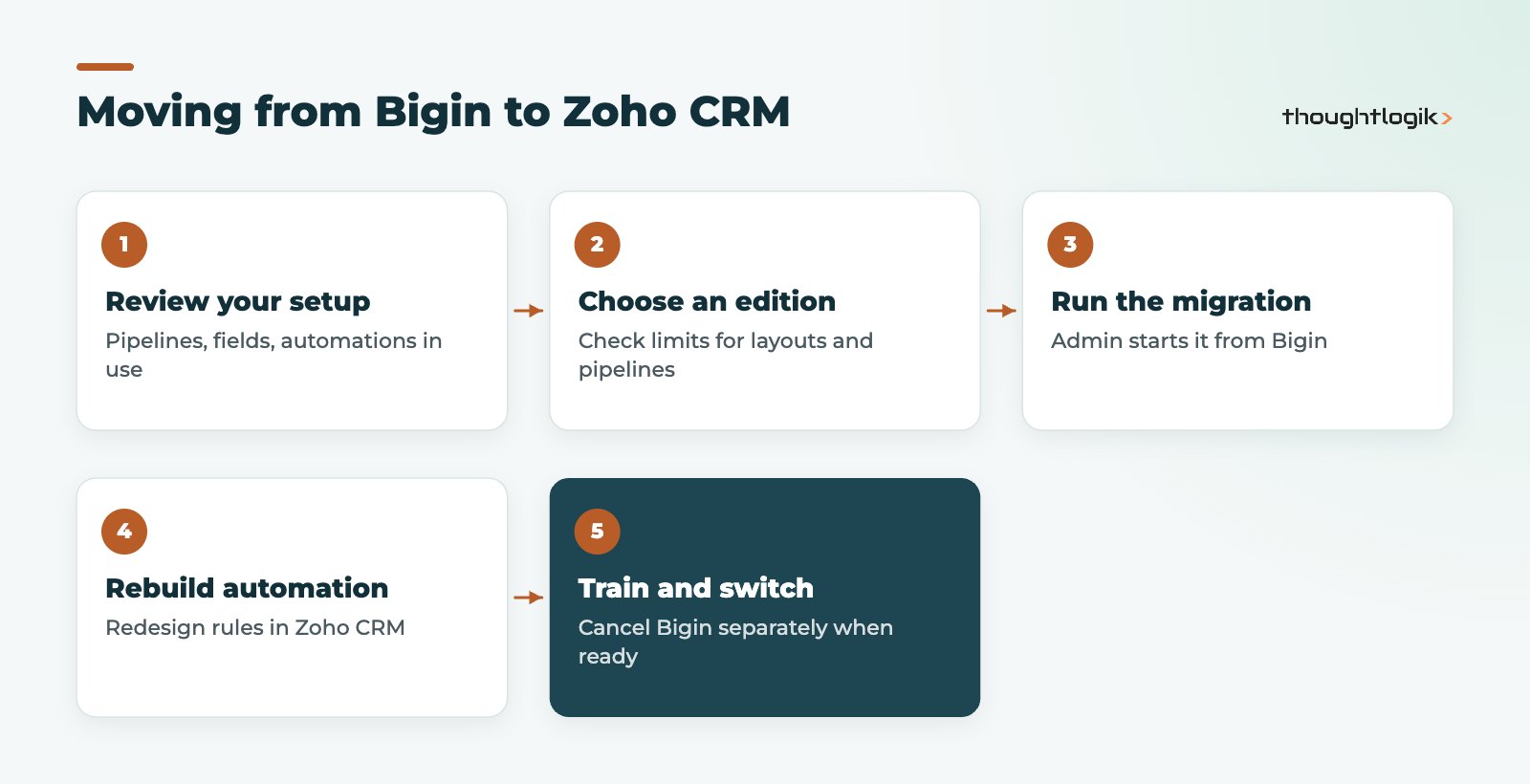
Zoho has built an upgrade path into Bigin. According to Zoho’s help documentation, only an administrator can start it, from the profile menu in Bigin, choosing a Zoho CRM edition and then running the one-click migration in Zoho CRM’s data administration area.
What migrates when you upgrade from Bigin to Zoho CRM?
Zoho lists users, companies, contacts, team pipelines, sub-pipelines, stages, tasks, events, notes, attachments, associated products and photos, along with applicable custom fields. There are some important mapping rules:
- Team pipelines become layouts in the Deals module of Zoho CRM.
- Sub-pipelines become pipelines in Zoho CRM.
- What is created depends on your Zoho CRM edition’s limits, so check how many layouts and pipelines your chosen edition allows.
- Add-ons bought in Bigin, such as phone numbers, do not transfer.
- Your Bigin subscription is not cancelled automatically and Bigin data is not deleted; you cancel it separately.
What still needs work after the migration?
The migration moves your data, but the upgrade is also a chance to redesign. Automation built in Bigin should be reviewed and rebuilt using Zoho CRM’s workflow rules and Blueprint, and it is worth revisiting stages, fields and permissions with fresh eyes. Treat it as a small implementation rather than a switch-flip. Our Zoho CRM implementation checklist is a useful guide.
Bigin vs Zoho CRM: cost factors to weigh
We do not quote licence prices here because they change; see our Zoho pricing guide for the UK. The more useful comparison is total cost over two or three years, which depends on:
- Licences: Bigin is positioned as the more affordable option per user, while Zoho CRM costs vary by edition.
- Setup effort: Bigin needs little configuration; Zoho CRM usually benefits from proper design and implementation.
- Switching later: moving from Bigin to Zoho CRM means a migration, automation rebuild and retraining.
- Workarounds: time lost to spreadsheets and manual steps when a system is too limited is a real cost, even if it never appears on an invoice.
When we run the Bigin vs Zoho CRM numbers with clients, the switching cost is the factor most often overlooked.
Signs it is time to move from Bigin
- People keep tracking information in spreadsheets because Bigin has nowhere to put it.
- You are working around automation limits with manual reminders.
- Managers want reports that combine data Bigin does not hold.
- You need customer or partner portals, or approvals across departments.
If two or more apply, the Bigin vs Zoho CRM question has probably answered itself.
How ThoughtLogik helps
We set up Bigin for small teams and manage upgrades from Bigin to Zoho CRM when businesses outgrow it.
- An honest recommendation on Bigin or Zoho CRM based on your processes
- Bigin setup with pipelines, fields and automation
- Planned migration to Zoho CRM, including edition choice and automation rebuild
- Training and support through our Zoho support service
Frequently asked questions
Is Bigin a cut-down version of Zoho CRM?
Not exactly. Bigin is a separate product designed around pipelines for small businesses. It shares Zoho’s platform and can be upgraded to Zoho CRM, but it is built to be simpler rather than being a limited edition of Zoho CRM.
Will I lose data when I upgrade from Bigin to Zoho CRM?
Zoho’s migration moves core records, pipelines, activities, notes and attachments, and Bigin data is not deleted. Paid add-ons do not transfer, and edition limits affect how pipelines are recreated.
Can Bigin connect to our other business apps?
Bigin offers integrations with other Zoho apps and third-party tools. Check the current list for the specific tools you use; if you need deep, two-way integrations with finance or ERP systems, that is often a sign Zoho CRM is the better fit.
Which is better for a five-person sales team in the Bigin vs Zoho CRM choice?
If the process is simple and the priority is adoption, Bigin. If you need quotes, approvals, custom modules or integrations soon, start with Zoho CRM.
Do team pipelines in Bigin carry across to Zoho CRM?
Yes. Team pipelines become layouts in the Deals module and sub-pipelines become pipelines, subject to your Zoho CRM edition’s limits.
Outgrowing your first CRM? We can tell you whether Bigin or Zoho CRM is the right next step. Book a free consultation or see our Zoho CRM UK services.





