
Short answer
Odoo inventory management is built on three ideas: warehouses and locations describe where stock sits, routes describe how it moves, and valuation describes what it is worth in the accounts. Configure those three well and Odoo tracks every receipt, transfer and delivery in real time, replenishes through reordering rules and keeps stock values aligned with the ledger. Most problems we fix trace back to one of the three being set up in a hurry.
Key takeaways
- Every stock movement in Odoo goes from one location to another; nothing just appears.
- Receipts and deliveries can run in one, two or three steps per warehouse.
- Routes and rules drive replenishment, dropshipping and make to order.
- Costing method (standard, average or FIFO) is set on the product category.
- Stock accuracy depends on process discipline as much as configuration.
Inventory is where ERP projects succeed or fail for distributors, wholesalers and manufacturers. This Odoo inventory management guide explains how Odoo models stock, the choices that matter most, and how to keep figures right after go-live.
How does Odoo inventory management work?
Odoo uses double-entry stock movements: every move takes quantity out of one location and puts it into another. Suppliers, customers, production and inventory adjustments are all treated as locations. That is why Odoo can always explain where stock came from and went, and why an unexpected negative quantity usually signals a process being skipped rather than a system fault.
The Odoo Inventory documentation covers each feature; below we focus on the design choices.
Warehouses and locations
A warehouse in Odoo is a physical site with its own receipt and delivery operations. Inside it, you can switch on storage locations to model zones, aisles, racks and bins. For a single stockroom, one location may be enough. For a larger site, locations make picking faster and counts more accurate. Putaway rules can then direct incoming products to the right location automatically, by product or product category.
When do you need Odoo warehouse management features?
Switch on multi-step routes, storage locations and putaway rules when you have more than one site, a separate goods-in area, quality checks on receipt, or packing before dispatch. Odoo warehouse management is flexible, but every extra step is another transfer for staff to process, so add complexity only where it improves control.
What are Odoo routes?
Odoo routes are sets of rules that tell stock how to move. The most common are the warehouse receipt and delivery routes:
| Setting | One step | Two steps | Three steps |
|---|---|---|---|
| Receipts | Receive straight into stock | Receive to input, then store | Receive to input, quality check, then store |
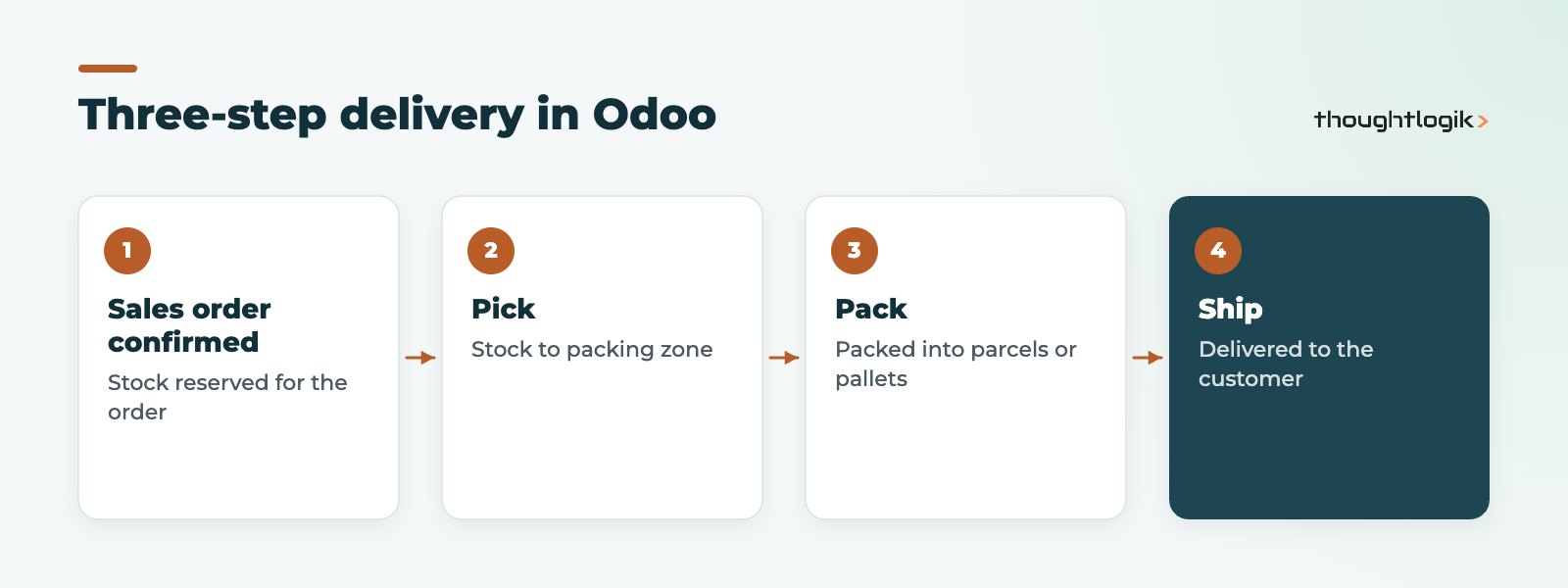
| Deliveries | Ship directly from stock | Pick, then ship | Pick, pack, then ship |
The three-step delivery flow is shown below. It suits sites where packing is a separate station.
Other useful Odoo routes
- Buy: replenish by purchase order from a vendor.
- Manufacture: replenish by manufacturing order (see our Odoo MRP guide).
- Make to order: create a purchase or manufacturing order from a confirmed sale.
- Dropship: the supplier ships directly to your customer.
- Resupply between warehouses: move stock from a central site to branches.
Replenishment with reordering rules
Reordering rules set a minimum and maximum for a product in a location. When forecast stock falls below the minimum, Odoo proposes or creates a purchase or manufacturing order to bring it back up to the maximum. Supplier lead times and security lead times make those suggestions arrive in time. Reordering rules work best for steady items; for seasonal or project-driven demand, a planner reviewing forecasts is usually better. Review your minimums regularly, because rules set once at go-live drift out of line with demand.
Inventory valuation in Odoo
Inventory valuation connects stock to the accounts. It involves two settings:
- Costing method, set on the product category: standard price (a fixed cost you maintain), average cost (recalculated as receipts arrive) or first in, first out (each receipt keeps its own cost).
- Valuation approach: periodic, where stock value is adjusted in the accounts at period end, or perpetual (automated), where each stock movement posts its accounting entry as it happens.
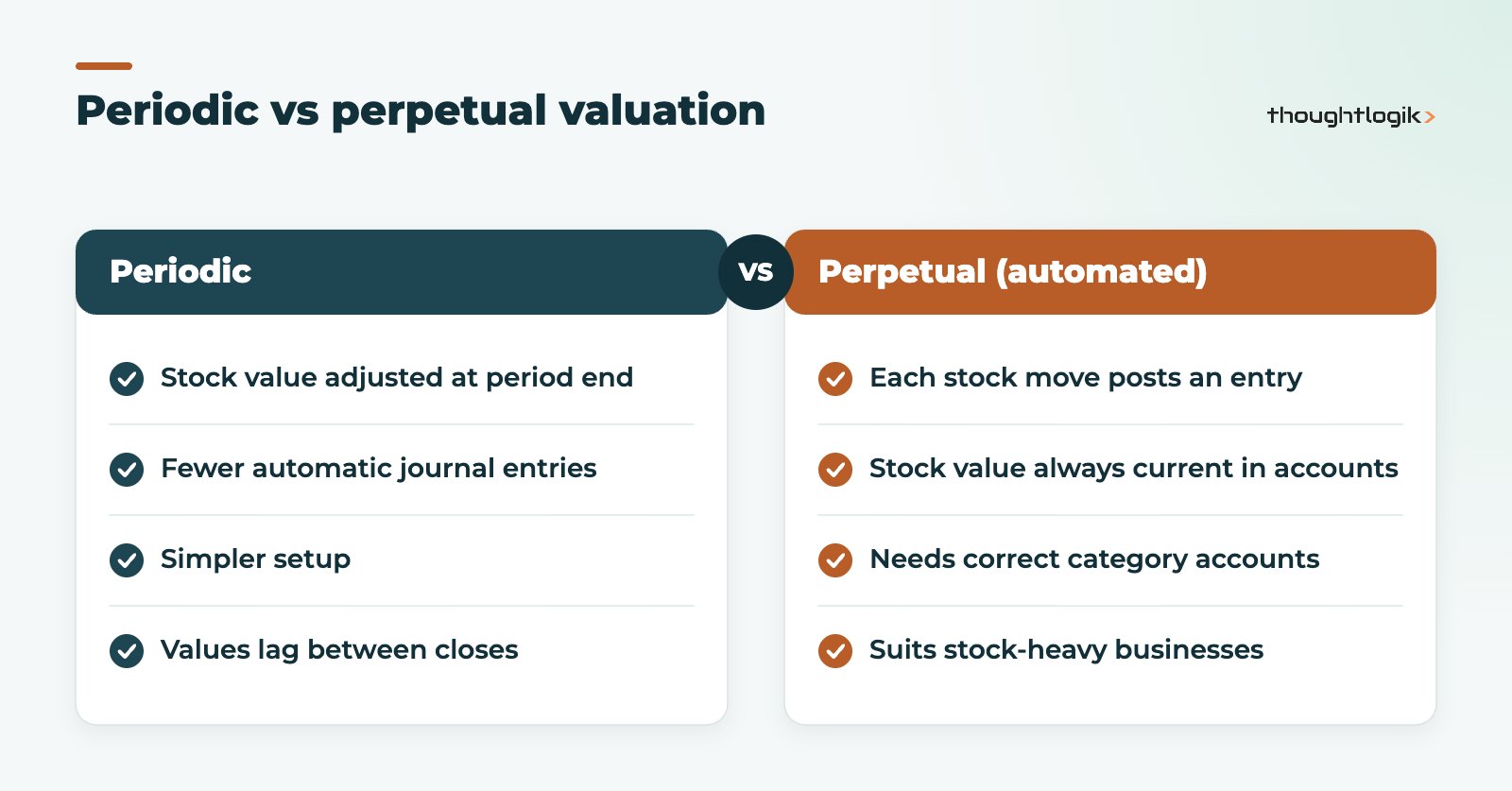
Choose with your accountant, and decide before go-live: changing the costing method later affects existing stock values. For imported goods, Odoo’s landed costs feature adds freight and duty to product cost; see our guide to Odoo landed costs.
Lots and serial numbers
Enable lot or serial tracking on products that need traceability. Odoo then records which lots were received, moved, used in production and delivered, so you can trace forwards and backwards. Removal strategies such as first expiry, first out can then use that data to choose which lot to pick, which matters for food and other dated goods. Our post on Odoo traceability covers this in depth.
Setting up Odoo inventory management in the right order
The order of setup matters, because later settings depend on earlier ones. On projects we follow this sequence:
- Products and units of measure. Clean product codes, purchase and sales units, weights and barcodes.
- Product categories. Group products by how they are costed and accounted for, since the costing method lives here.
- Warehouses and locations. Model sites, zones and bins at the level your team will actually use.
- Routes. Choose receipt and delivery steps per warehouse, then add buy, manufacture, make to order or dropship routes where needed.
- Replenishment. Set supplier information, lead times and reordering rules.
- Opening stock. Load counted quantities by location, with costs set first so valuation starts correctly.
Skipping ahead, for example loading stock before categories and costs are right, is the most common cause of valuation clean-up work in the first months of Odoo inventory management.
Odoo inventory management for multi-channel sellers
If you sell through a web shop, marketplaces and a trade counter, the value of Odoo inventory management is one stock figure shared by every channel. Odoo’s own eCommerce and Point of Sale apps use the same stock directly, while external platforms connect through integrations. Decide which warehouse or location feeds each channel, and whether some stock should be held back for key accounts, before connecting anything.
Keeping Odoo inventory management accurate
Configuration gives you the structure; discipline keeps the numbers right. The habits that matter most:
- Validate receipts and deliveries when goods physically move, not at the end of the day.
- Use barcode scanning to cut picking and receiving errors (see our guide to the Odoo Barcode app).
- Run regular cycle counts on high-value or fast-moving lines rather than relying on one annual stocktake.
- Investigate negative stock immediately; it always points to a skipped step.
We explore these causes further in our article on Odoo inventory accuracy.
How ThoughtLogik helps
We design Odoo inventory management around how your warehouse really runs, then train the people who use it every day.
- Warehouse, location and route design
- Replenishment strategy and reordering rules
- Valuation setup agreed with your finance team
- Barcode rollout and stock accuracy reviews
Frequently asked questions
Can Odoo inventory management handle multiple warehouses?
Yes. Each warehouse has its own operations and routes, and stock can be resupplied between sites.
What is the difference between routes and reordering rules?
Routes define how stock moves or is replenished; reordering rules decide when and how much to replenish.
Which inventory valuation method should a UK business use?
It depends on your products and reporting needs. Agree the costing method and valuation approach with your accountant before go-live.
Is Odoo inventory management included in Community?
The core Inventory app is available in both editions, but some related tools, such as the Barcode app, are Enterprise features.
Does Odoo warehouse management support pick, pack and ship?
Yes. Set deliveries to three steps on the warehouse to create separate pick, pack and ship transfers.
Stock figures you cannot trust? We will review your Odoo setup and processes. Book a free consultation or see our solutions for wholesale and distribution.





