

Short answer
Zoho Deluge is Zoho’s scripting language, and in Zoho CRM it powers custom functions that run from workflow rules, buttons, schedules, related lists, validation rules or as standalone functions. Use it when standard automation cannot do the job, such as calculations across related records or calls to external systems. Keep functions small, documented and tested, because code needs maintaining in a way that configuration does not.
Key takeaways
- Deluge is Zoho’s own scripting language, used across Zoho CRM, Zoho Creator and other Zoho apps.
- Functions are created under Setup, Developer Hub, Functions, for a specific location.
- A function built for one location, such as workflow rules, cannot be reused in another, such as schedules.
- Use functions for logic standard features cannot handle, not as a default.
- Daily limits on function calls apply and vary with your edition and licences.
Zoho CRM’s standard automation covers a lot: workflow rules, Blueprint, field updates, webhooks and approval processes. Sooner or later, though, most growing businesses hit a requirement it cannot meet on its own. That is where Zoho Deluge comes in. This guide explains what Deluge custom functions are, where they run, when to use them, and how to keep them from becoming a maintenance problem.
What is Zoho Deluge?
Deluge (short for Data Enriched Language for the Universal Grid Environment) is Zoho’s scripting language. It is used across Zoho apps, including Zoho CRM and Zoho Creator, and is designed to be readable, with built-in tasks for fetching, creating and updating records in Zoho apps and for calling external APIs. You write Deluge script in an editor inside Zoho CRM; there is no server to manage.
Where do Zoho CRM functions run?
According to Zoho’s developer documentation on setting up functions, you create functions under Setup, Developer Hub, Functions, and choose where each one will be used.
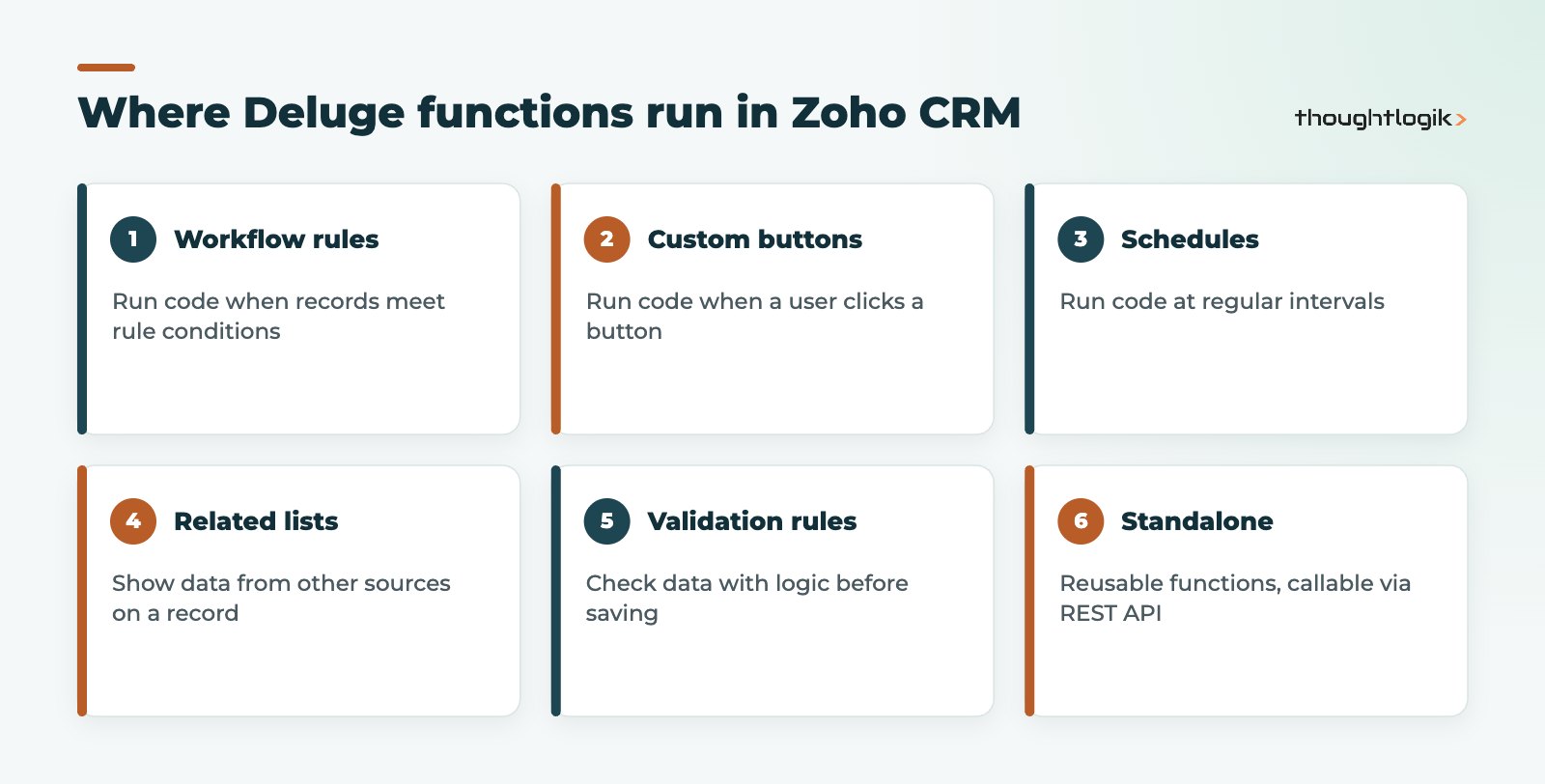
One detail catches people out: a function created for one location cannot be used elsewhere. A function built for workflow rules cannot be attached to a schedule, for example. If you need the same logic in two places, put it in one function and call it from small wrappers, or create standalone functions that other functions call.
| Location | Triggered by | Typical use |
|---|---|---|
| Workflow rules | A record meeting rule conditions | Roll up values, create linked records, sync to another system |
| Custom buttons | A user clicking a button | Generate a document, push a record to finance on demand |
| Schedules | A set time or interval | Nightly data clean-up, periodic syncs |
| Related lists | Opening a record | Show invoices from an external system on an account |
| Validation rules | Saving a record | Check a value against logic or another record |
| Standalone | Other functions, or a REST API call | Shared logic, inbound integrations |
Functions can also be used in Blueprint transitions, alongside workflow rules, as part of your wider automation.
When should you use Deluge custom functions?
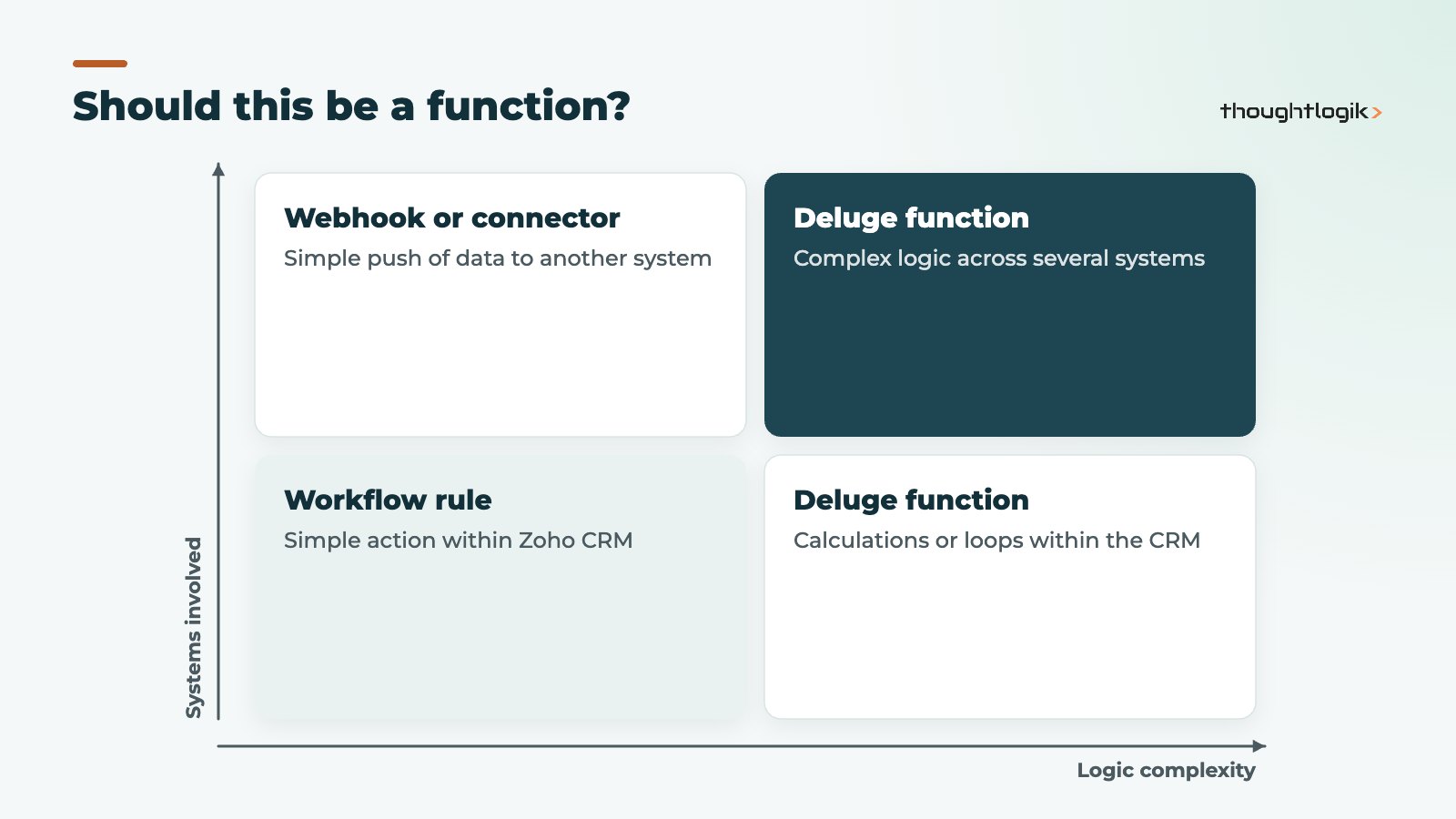
Code should be the last resort, not the first. Before writing a function, check whether a workflow field update, Blueprint, formula field, rollup summary field or webhook can do the job. Our Zoho CRM workflow rules guide covers what standard automation can handle.
Good reasons to use Zoho Deluge
- Logic that loops through related records, such as totalling won deals per account.
- Calculations that depend on several modules or on external data.
- Integrations that need data transformed, or that must read a response and act on it.
- Actions that standard automation cannot perform, such as creating several records with different values from one trigger.
Signs you should not
- A standard feature already does it, perhaps with a small process change.
- Nobody in the business, or at your partner, will be able to maintain the code.
- The function is a workaround for a design problem that should be fixed instead.
A worked Deluge script example
A common request is a total of won deal value on each account. The function below, attached to a workflow rule on the Deals module with the account ID passed in as an argument, adds up closed-won deals and writes the total to a custom currency field on the account.
dealList = zoho.crm.getRelatedRecords("Deals", "Accounts", accountId.toLong());
total = 0;
for each deal in dealList
{
    if(deal.get("Stage") == "Closed Won")
    {
        total = total + ifnull(deal.get("Amount"), 0);
    }
}
updateMap = Map();
updateMap.put("Total_Won_Value", total);
response = zoho.crm.updateRecord("Accounts", accountId.toLong(), updateMap);
info response;
A few points worth noting. The field API names (“Stage”, “Amount”, “Total_Won_Value”) must match your own CRM. The info statement writes the response to the log, which helps when testing with Save and Execute. For large accounts, related record calls return results in pages, so production code should handle that. And before writing it at all, check whether a rollup summary field in your edition would do the same job without code.
Best practice for Zoho Deluge in Zoho CRM
- One job per function. Small functions are easier to test and reuse.
- Name and describe everything. Say what the function does, which rule calls it and who owns it.
- Use connections for external APIs. Zoho’s connections handle authentication so credentials never appear in code.
- Handle failures. Check responses and log errors, rather than assuming every call succeeds.
- Test before activating. Use Save and Execute with sample records, and a sandbox where your edition includes one; see our Zoho CRM sandbox guide.
- Watch the limits. Zoho applies daily limits to function calls and API calls, which vary by edition and licence count. Heavy integrations may need a different pattern, such as batching.
Keeping Zoho CRM functions maintainable over time
Most problems with Zoho CRM functions appear months after they were written. A field is renamed, a new pipeline stage is added, or the person who wrote the code leaves, and a function quietly stops doing what everyone assumes it does. A little discipline prevents this:
- Keep a simple register of every function: its location, what calls it, the fields it reads and writes, and its owner.
- Check the register whenever fields, stages or layouts change.
- Review failure logs and usage regularly, and remove functions nobody needs.
Treat Zoho Deluge code like any other business asset: documented, owned and reviewed.
Zoho Deluge also runs in Zoho Creator, so skills transfer between apps. If you are weighing up a low-code platform, see our comparison of Zoho Creator vs Power Apps.
How ThoughtLogik helps
Our technical team writes and maintains Zoho Deluge functions for UK businesses, from single automations to full integrations.
- Review of whether a requirement needs code or configuration
- Deluge functions with documentation, logging and error handling
- Integrations with finance, ERP and third-party systems via our Zoho integration services
- Audits and fixes for existing functions that are slow or failing
Frequently asked questions
Is Zoho Deluge hard to learn?
Deluge is designed to be readable, and people with some scripting experience pick it up quickly. Writing reliable integrations still needs care with error handling, limits and data structures.
Which Zoho CRM editions support Deluge custom functions?
Function availability and limits depend on your Zoho CRM edition. Check Zoho’s feature comparison, or ask us to review what your edition allows.
Can a Zoho CRM function call an external API?
Yes. Deluge can call external APIs, and Zoho’s connections feature manages authentication so you do not store credentials in the script.
What are standalone functions used for?
Standalone functions hold shared logic that other functions can call, and they can be exposed as a REST API so external systems can trigger them.
Can I reuse a workflow function in a schedule?
No. Zoho states that a function created for one location cannot be used in another. Put shared logic in a standalone function and call it from both.
Need something standard automation cannot do? We will tell you whether it needs code, and build it properly if it does. Book a free consultation or see our Zoho custom development services.





