Short answer
Odoo Quality is the app that builds inspections into your receipts, manufacturing orders and deliveries. You define quality control points that say what to check, where and how often; Odoo then creates quality checks for operators to complete, and any problem is logged as a quality alert with root cause, corrective and preventive actions.
Key takeaways
- Quality control points define the operation, products, frequency and type of each check.
- Checks can run on every operation, randomly, periodically or on demand.
- Operators complete quality checks on the order or on the Shop Floor tablet view.
- Quality alerts track issues with root cause, corrective actions and preventive actions.
- Odoo Quality records evidence; your quality management system still defines the rules.
Paper checklists on clipboards have a habit of going missing exactly when an auditor or a customer asks for them. Separate quality spreadsheets drift away from what actually happened on the shop floor. The Odoo Quality app puts inspections inside the operations they relate to, so the record of each check sits on the receipt, manufacturing order or work order it belongs to.
What does the Odoo Quality app do?
It has three main building blocks, each with its own menu:
- Quality control points: the rules. Which operation, which products, which type of check and how often.
- Quality checks: the individual inspections Odoo creates from those rules, completed by operators.
- Quality alerts: records of problems, with ownership and actions, moved through stages until resolved.
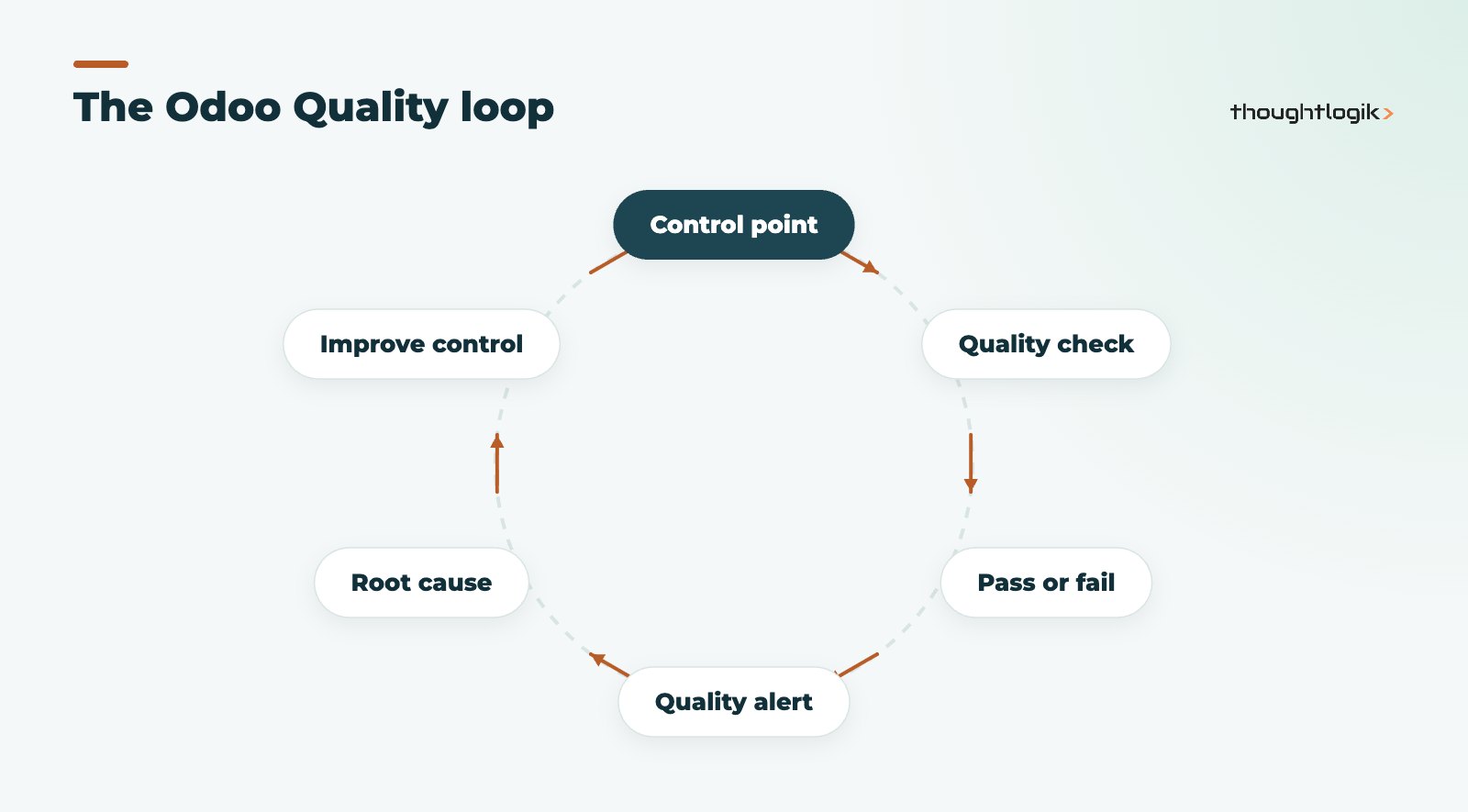
Because Odoo Quality shares a database with Inventory and Manufacturing, a check can block progress at the right moment: an operator on a work order sees the check as a step, and a warehouse user sees it on the receipt before validating.
How do quality control points work?
Control points are created under Quality, then Quality Control, then Control Points. According to the Odoo documentation on quality control points, each one needs at least one operation type (for example Receipts, Manufacturing or Delivery Orders) and can be narrowed to specific products or product categories.
Choosing how often Odoo Quality creates checks
Two settings control volume. Control Per decides whether one check is created per operation, per product, or for a percentage of quantity. Control Frequency decides how often:
| Frequency | What it does | Typical use |
|---|---|---|
| All | Every time the conditions are met | Critical characteristics, new suppliers |
| Randomly | A set percentage of operations | Sampling on stable, trusted processes |
| Periodically | At a set interval of days, weeks or months | Routine verification, calibration checks |
| On-Demand | Only when requested manually | Investigations and ad hoc inspections |
Start with fewer, well-chosen quality control points. Checks that everyone clicks through without reading give you records, not quality.
Which check types are available?
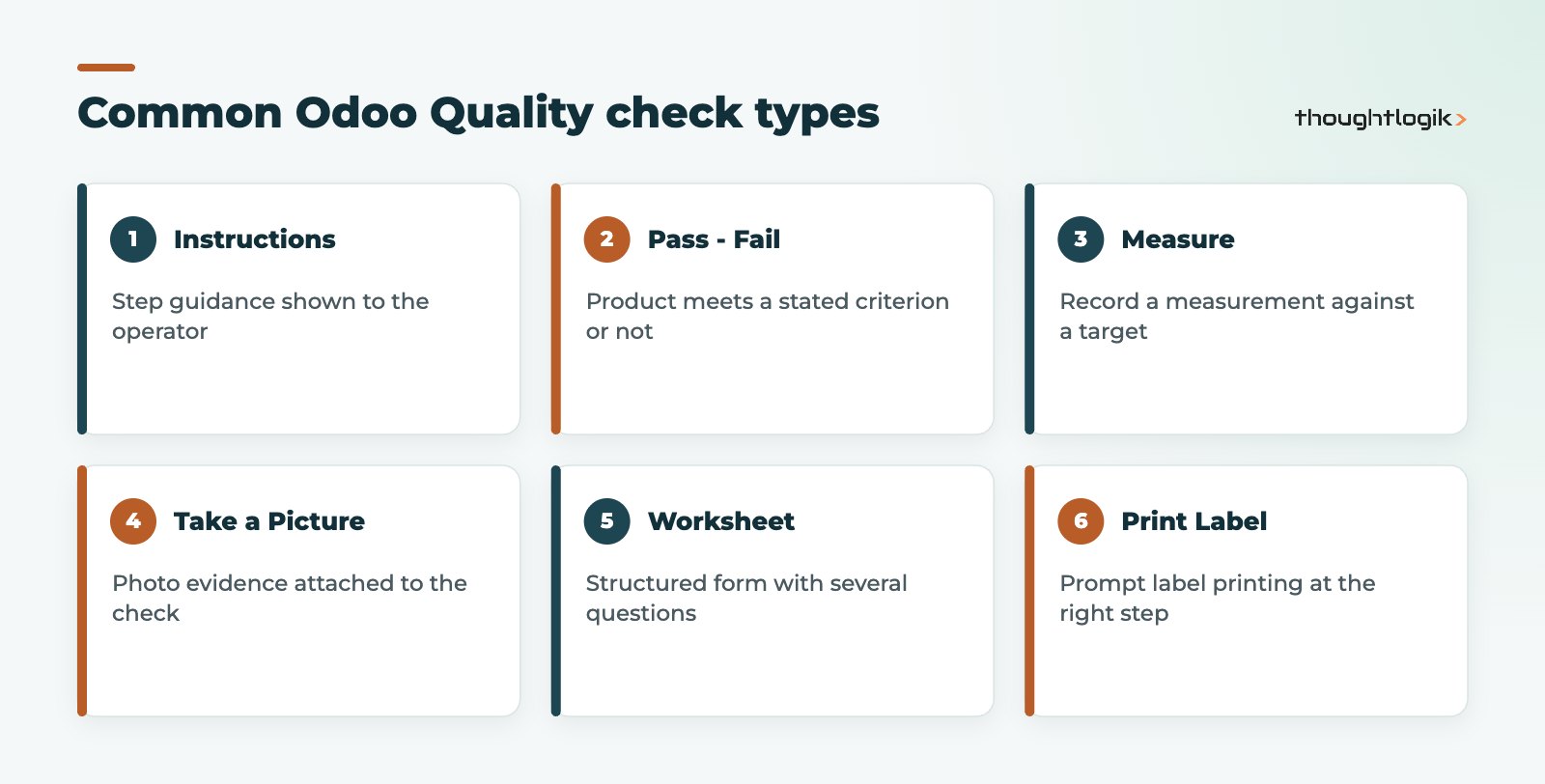
Odoo offers several check types, including Instructions, Take a Picture, Register Consumed Materials, Register Production, Print Label, Pass – Fail, Measure, Spreadsheet and Worksheet. For check types that can fail, a Message If Failure tells the operator what to do next, such as quarantine the batch or call a supervisor.
Completing quality checks on receipts and production
Quality checks appear where the work is done. On a receipt or manufacturing order, a Quality Checks button opens the checks still to complete. For manufacturing with work orders, checks appear as steps in the Shop Floor tablet view, so operators record results without leaving their station. Staff can also create a one-off check manually from the Quality app when something looks wrong.
Linking checks to lots and serial numbers makes the records far more useful: if a batch is questioned later, you can see who checked it, when and with what result. Our guide to Odoo traceability with lots and serials covers that setup.
How do quality alerts work in Odoo Quality?
A quality alert is the record of a problem. Users can raise one from the Quality app, from a manufacturing order or inventory operation with a check, or from a work order on the Shop Floor. Each alert holds the product, work centre or transfer involved, the responsible team and person, a root cause and a priority, plus tabs for a description, corrective actions and preventive actions.
Alerts move through stages on a kanban board, which gives quality managers a live view of open issues. Vendor details on the alert make it easier to review supplier quality over time.
Is Odoo Quality a full quality management system?
Odoo Quality handles operational inspection and issue tracking well. A quality management system, such as one certified to ISO 9001, also covers policies, document control, audits, training and management review. Odoo can support parts of that (documents, training records, maintenance), but the system is your processes and people, not the software. Treat Odoo as the place where evidence is created and kept.
Designing an inspection plan before you configure anything
The most common mistake we see is configuring checks straight from a long list of everything the business could possibly inspect. Operators quickly learn to click through, and the records lose their value. A better approach is to start on paper:
- List your critical characteristics. What failures actually reach customers, cause returns or create safety or compliance risk? Those deserve checks on every operation.
- Map where each failure can be caught earliest. A supplier defect is cheapest to catch on receipt, not at final inspection.
- Decide the evidence you need. A simple pass or fail, a measured value, a photo, or a full worksheet. Match the check type to what an auditor or customer would ask to see.
- Set sensible frequencies. Use sampling where processes are stable, and tighten frequency for new products, new suppliers or after a failure.
- Agree what happens on failure. Who is told, where the stock goes and who can release it.
Once the plan is agreed, configuring it is quick, and it is easy to review each quarter: look at which checks never fail (candidates for sampling) and which alerts keep recurring (candidates for tighter control or a process change). If you are still weighing up editions, our Odoo Community vs Enterprise comparison explains which apps each includes.
Where Odoo Quality fits with other apps
- Manufacturing: checks as work order steps; see our Odoo MRP guide.
- Inventory: incoming inspection on receipts before stock is available.
- Maintenance: recurring equipment problems found in quality alerts often lead to preventive maintenance; see our Odoo Maintenance guide.
- Purchase: supplier issues recorded against the vendor.
Food and drink producers have extra requirements around batches and shelf life; our Odoo for food manufacturing post covers those.
How ThoughtLogik helps
We help manufacturers translate their existing quality plans into Odoo Quality without drowning operators in checks. ThoughtLogik is itself ISO 9001 certified, so we understand what auditors look for.
- Review of your inspection plan and critical characteristics
- Design of quality control points, frequencies and check types
- Quality alerts workflow, teams and stages
- Operator training on the Shop Floor view
Frequently asked questions
Is Odoo Quality included in Odoo Community?
Odoo Quality is an Enterprise app. Check Odoo pricing for the UK and our comparison of Community and Enterprise before planning around it.
Can quality checks stop a receipt being validated?
Checks appear on the receipt and are meant to be completed before validation. Agree with your team how failed checks are handled, for example moving stock to a quarantine location.
Can Odoo Quality do random sampling?
Yes. Set the control point frequency to Randomly with a percentage, or use Control Per Quantity to check a percentage of the quantity processed.
Who should own quality alerts?
Assign alerts to a quality team and a responsible person. Clear ownership and stages stop alerts sitting open with no action.
Want quality records that stand up to an audit? We will build inspections into the way your team already works. Book a free consultation or see our manufacturing solutions.