Short answer
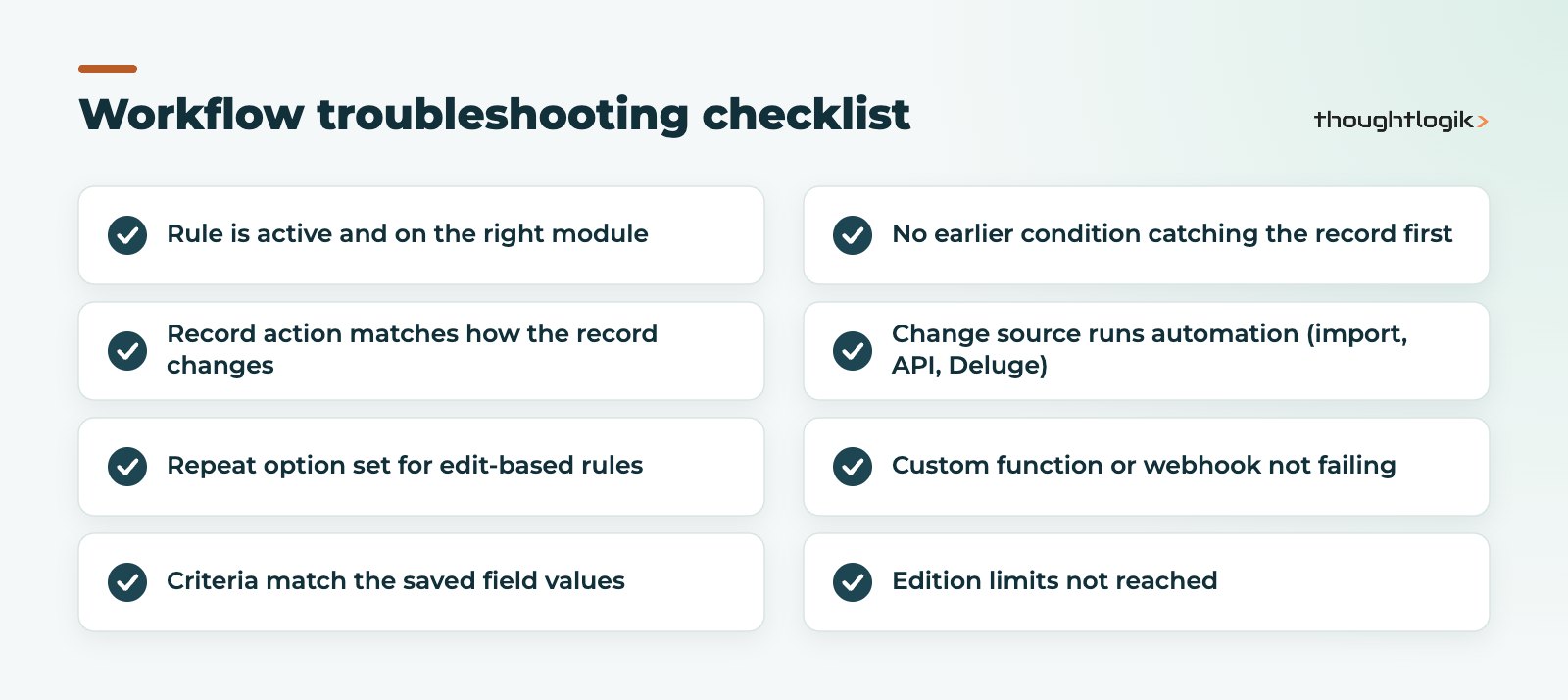
A Zoho CRM workflow not triggering is almost always caused by one of a few things: the rule is inactive, its record action does not match how the record changes, the criteria do not match the saved values, or the change came from a source that skips automation, such as an import, API call or Deluge update. Work through the checks below in order and you will usually find the cause within minutes.
Key takeaways
- Check the rule is active and on the right module before anything else.
- Edit-based rules only fire again on later edits if the repeat option is ticked.
- With multiple conditions, a record is handled by the first condition it meets; later ones are ignored.
- Imports, API calls and Deluge updates can all bypass workflows unless told to run them.
- A field update made by one workflow does not trigger other workflow rules.
A Zoho CRM workflow not triggering, a rule that silently does nothing, is one of the most common support questions we get from UK Zoho users. The good news is that the causes are predictable. This checklist is ordered from the quickest checks to the more subtle ones, so start at the top. If you are building rules from scratch, our Zoho CRM workflow rules guide covers the design side.
Why is my Zoho CRM workflow not triggering?
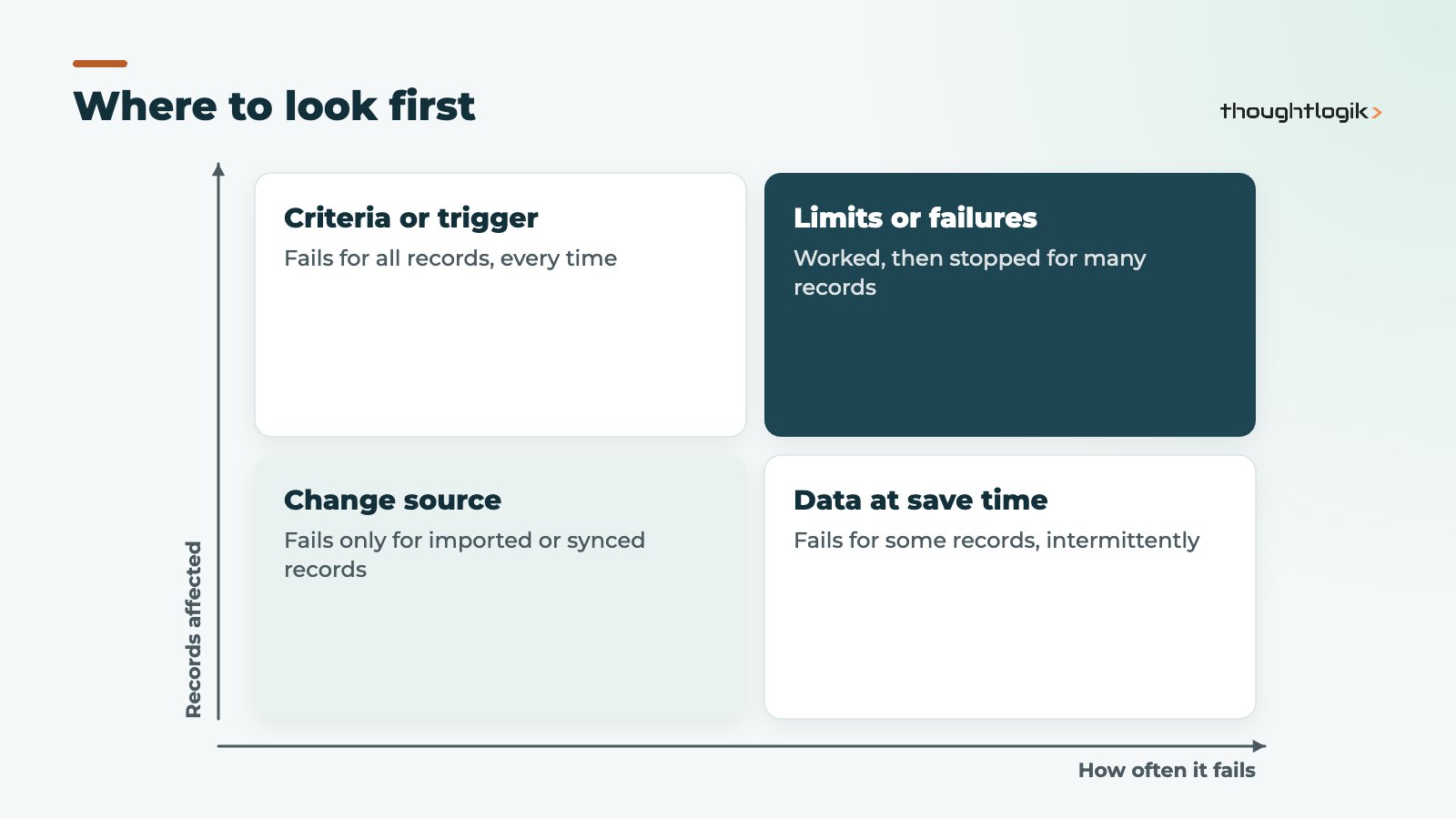
Start by pinning down the symptom, because it points to the cause. Does the rule fail for every record or only some? Did it ever work? Does it fail only for records created by an import, a web form or an integration? A Zoho CRM workflow not triggering for every record usually means a setup or criteria problem. One that fails only for some records usually means the data at save time, or the source of the change, is different for those records. Write the answer down before you change anything, so you can tell whether a fix actually worked.
Before digging into criteria, confirm the basics in Setup, then Automation, then Workflow Rules:
- Is the rule active? Rules are often switched off during testing and never switched back on.
- Is it on the right module? A rule on Leads will not fire for a converted contact or deal.
- Is it within your edition’s limits? Each edition caps how many rules can be active per module. If you are at the cap, a new rule may not be activated.
Check the record action and the repeat option
Workflow rules can fire when a record is created, edited, created or edited, or deleted, as well as on date fields, score changes, notes and more. If records arrive through a web form (a create) but the rule is set to edit, it will never fire for them. Choose “Create or Edit” when records can reach the right state either way.
For edit-based rules, there is a checkbox labelled “Repeat this workflow every time a record is edited”. Without it, the rule fires only the first time a record meets the criteria on edit. This is the single most common reason for “it worked once and then stopped”. Also check whether the rule watches any field or only specific fields: when “Specific field(s) gets modified” is chosen, editing any other field will not fire it.
Are the workflow criteria actually met?
Workflow criteria are evaluated against the values saved on the record at that moment. Common mismatches:
- Picklist values that were renamed after the rule was built.
- AND and OR logic grouped differently from what you intended.
- A field that is blank at save time but populated seconds later by another process.
- Criteria referencing a layout the record is not using.
Open a record that should have triggered the rule and compare every field in the criteria against its saved value. It is slow, but it resolves a large share of cases.
Multiple conditions: only the first match runs
A rule can hold several conditions. Zoho validates a record against each condition in turn, and once it meets one, the conditions that follow are ignored. If an early condition is broad (for example “Lead Source is not empty”), it can quietly catch records you expected a later condition to handle. Reorder conditions from most specific to most general.
Did the change come from a source that skips automation?
If the rule works when you edit a record by hand, but you still see the Zoho CRM workflow not triggering for other records, the source of the change is the likely culprit.
| Change source | What to check |
|---|---|
| Import | In the import wizard, the option to trigger automation and process management for imported records must be selected |
| API integration | The trigger parameter: omitted runs applicable automation, an empty list skips it |
| Deluge custom function | Record updates from Deluge do not trigger workflows unless the trigger option is passed |
| Another workflow’s field update | A field update from one workflow does not trigger other workflow rules |
Imported records and historic data
For imported records, select the automation option at the final step of the import. If data was already imported without it, you can make a controlled edit (for example ticking a temporary checkbox) with an edit-based rule, after testing on a small batch. Be careful: firing a year of welcome emails at once is worse than not firing them.
Custom function and webhook actions
Sometimes the rule does trigger but its action fails. A custom function can error at runtime, or a webhook endpoint can reject the call. Run the function manually against the same record, add logging, and check failure notifications. Our Deluge custom functions guide covers error handling. If an email action “did not fire”, check the record’s emails and your domain’s authentication before blaming the rule.
Zoho CRM workflow not triggering after it used to work?
When a rule worked for months and then stopped, a Zoho CRM workflow not triggering is usually a side effect of another change. Look for what changed: a renamed picklist value, a new layout, a field made read-only, an integration that now writes records differently, or a daily limit on emails or function executions being reached. Blueprint transitions and approval processes can also hold records in states your criteria do not expect. The Zoho workflow rules documentation lists the current triggers and action limits.
Preventing a Zoho CRM workflow not triggering in future
- Name rules clearly with module, trigger and purpose.
- Keep a simple register of rules and what depends on them.
- Test changes in a Zoho CRM sandbox before deploying.
- Consolidate overlapping rules rather than adding new ones on top.
How ThoughtLogik helps
When automation misbehaves, ThoughtLogik can audit it and fix the root cause rather than patching symptoms.
- Workflow audits covering rules, functions, webhooks and integrations.
- Clean-up of overlapping or conflicting rules as part of our Zoho optimisation service.
- Ongoing admin cover through Zoho support.
Frequently asked questions
Why did my Zoho CRM workflow only fire once?
Edit-based rules fire only the first time a record meets the criteria unless the ‘Repeat this workflow every time a record is edited’ option is ticked.
Do imports trigger workflow rules in Zoho CRM?
Only if you select the option to trigger automation and process management for imported records during the import. Otherwise imported records do not run workflows.
Can one workflow trigger another?
A field update made by a workflow rule does not trigger other workflow rules, which prevents loops. Use a single rule with several actions, or a custom function, where you need chained logic.
Why is a Zoho CRM workflow not triggering for integration records?
API calls and Deluge updates can skip automation. Check the trigger parameter in the integration, or pass the trigger option in Deluge.
How do I know if the rule fired but the action failed?
Test the action on its own: run the custom function manually, check the webhook endpoint’s logs, and review the record’s emails and related lists.
Automation still not behaving? We can audit your workflow rules and integrations and fix the root cause. Book a free consultation or see our Zoho CRM UK services.