
Short answer
Odoo slow performance is rarely caused by Odoo itself: it usually comes from under-sized hosting, inefficient custom modules, heavy scheduled jobs, integrations or very large data sets. Identify which screens are slow and when, profile the slow action, then fix the root cause rather than simply adding server capacity.
Key takeaways
- Pin down exactly what is slow, for whom and at what time of day before changing anything.
- On self-hosted servers, Odoo workers and memory limits must match your user numbers.
- Custom modules are a frequent cause; compare the same action without them.
- Scheduled actions and integrations can slow everyone down if they run in working hours.
- Odoo performance tuning is a mix of hosting, code and housekeeping, not one setting.
“Odoo is slow” is one of the most common support calls we receive, and it covers very different problems: a sales order that takes ten seconds to save, a stock report that times out, or a whole system that crawls every morning at nine. Each has a different cause. This guide explains how we investigate Odoo slow performance and what actually fixes it.
What causes Odoo slow performance?
Standard Odoo on sensible hosting is quick for typical SME volumes. When a database is running slow, the cause is almost always something specific to that installation.
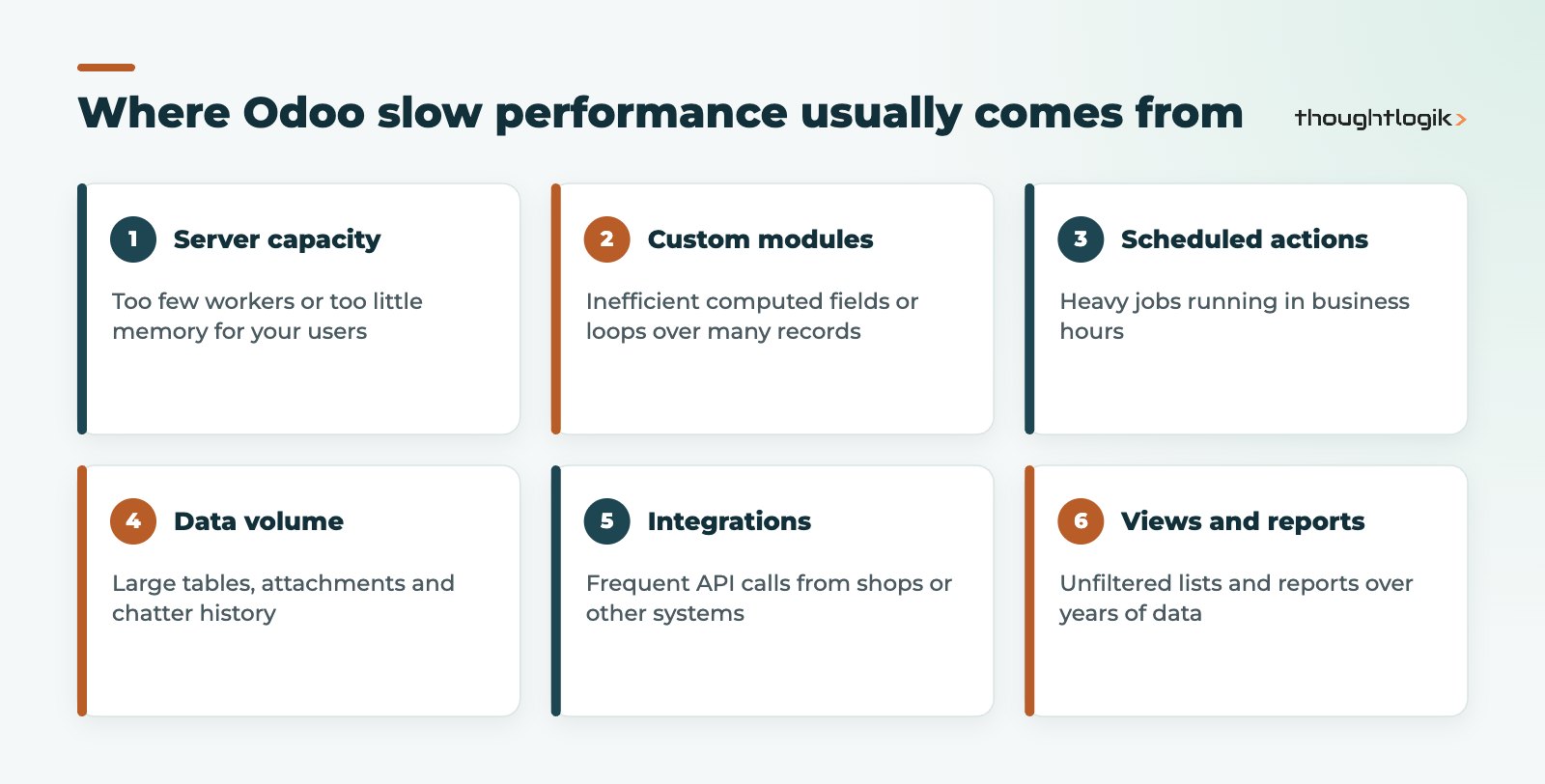
The pattern of the slowdown is your best clue. Slow for everyone at the same time points to capacity, a scheduled job or an integration burst. Slow on one screen for everyone points to code or data volume on that model. Slow for one person usually points to their network, browser or a saved filter.
Why is Odoo running slow on one screen only?
When a single form or list is slow, look first at what loads on it. Common culprits:
- Computed fields in custom modules that recalculate across thousands of records every time the view opens.
- Lists without filters showing every record since go-live, or grouped by fields that force heavy queries.
- Large chatter and attachment history on records that have been emailed back and forth for years.
- Automated actions that trigger on every save and call other processes.
A quick test is to reproduce the same action on a copy of the database with custom modules removed. If standard Odoo is fast, the problem is in the customisation. This is one reason we encourage clients to prefer configuration over custom code where possible; see our guide to Odoo customisation versus configuration.
How do developers profile Odoo slow performance?
Odoo includes profiling tools for developers that record the database queries and Python calls behind an action. Profiling turns “it feels slow” into “this function runs a separate query for every order line”, which is what a developer needs to fix it. Guessing without profiling often leads to expensive changes that make no difference.
Is your hosting the bottleneck?
How much you can tune depends on where Odoo runs. On Odoo Online the servers are managed by Odoo, so your levers are custom code, data and usage patterns. On Odoo.sh you choose the capacity of your subscription, including the number of workers. On-premise or cloud servers you manage give full control, and full responsibility. Our comparison of Odoo Online, Odoo.sh and on-premise covers the trade-offs.
How many Odoo workers do you need?
For self-hosted installations, the Odoo deployment documentation gives a rule of thumb of (number of CPUs × 2) + 1 for the maximum worker count, and notes that each worker can serve around six concurrent users. It also recommends running in multi-processing mode in production, setting memory and time limits per worker, and considering a separate server for the PostgreSQL database. Too few workers means requests queue behind each other; too many for the available memory means the server starts swapping, which is worse.
| Symptom | Likely cause | Typical fix |
|---|---|---|
| Everyone slow at peak times | Too few workers or too little memory | Resize hosting, adjust worker and memory settings |
| Slow at the same time each day | Scheduled action or batch import | Reschedule to off-peak, optimise the job |
| One screen slow for everyone | Custom computed fields or heavy views | Profile and rewrite the code, add filters |
| Reports timing out | Reporting across years of lines | Narrow date ranges, pre-aggregate, use dashboards |
| Slow after a shop sync | High integration API traffic | Batch updates, reduce polling frequency |
Can integrations and data volume cause Odoo slow performance?
Yes, and they are easy to overlook because nobody is clicking anything when the load arrives. An online shop, marketplace connector or warehouse system that polls Odoo every minute for stock levels, or pushes every order as a separate call, creates steady background traffic. At quiet times it is invisible; at peak times it competes with your users for the same capacity. Batching updates, syncing only records that changed and reducing polling frequency often make a noticeable difference. Our Odoo integrations team designs connectors with this in mind.
Data volume matters too. A database that has run for years accumulates mail messages, attachments, logs and old draft documents. Standard Odoo handles large volumes well when views are filtered sensibly, but custom reports that scan every line since go-live will get slower each year. Archiving records you no longer use and reviewing what gets logged are simple, low-risk steps that reduce Odoo slow performance over time.
How to speed up Odoo: a practical order of work
We follow the same sequence on every Odoo slow performance investigation, because it avoids spending money in the wrong place.
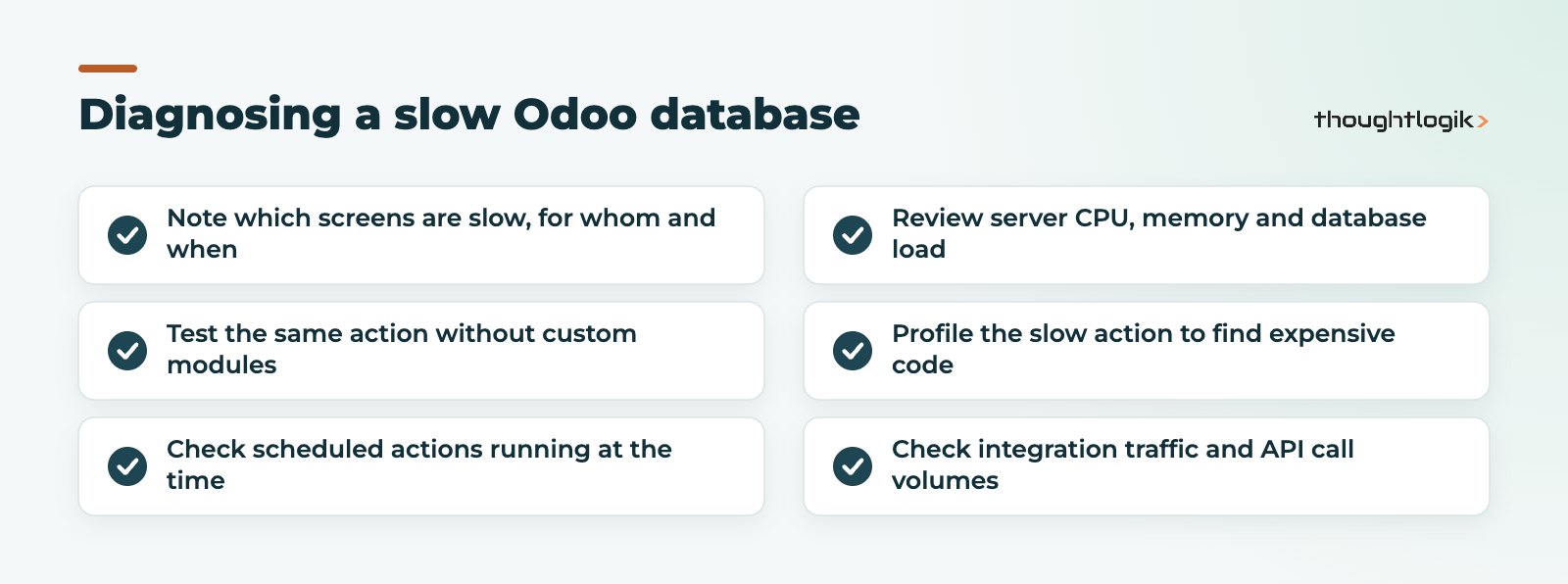
- Measure. Record which actions are slow, how long they take and when. Ask users for specific examples.
- Isolate. Test with and without custom modules, and with scheduled actions paused.
- Profile. Use Odoo’s profiler on the slowest action to find expensive queries or loops.
- Fix the root cause. Rewrite inefficient code, move jobs off-peak, batch integration calls.
- Right-size hosting. Only once the software is efficient, adjust capacity to match your users.
- Housekeep. Archive old records, clean up unused attachments and review logs.
Good Odoo performance tuning is iterative: fix the worst offender, measure again, move on to the next.
Does upgrading to a newer Odoo version help?
Sometimes. Each major release includes framework improvements, and moving to a current version also means custom modules get reviewed. But an upgrade will not fix a poorly written custom module on its own. See our Odoo upgrade service if you are on an older version.
Preventing Odoo slow performance in future
- Review custom code for performance before it goes live, not after complaints.
- Test with realistic data volumes, not a near-empty test database.
- Schedule heavy imports, recalculations and integration syncs out of hours.
- Build management reporting on filtered dashboards; see Odoo reporting and dashboards.
- Monitor response times so you notice degradation before users do.
How ThoughtLogik helps
We run structured performance reviews on Odoo databases, whether we built them or not, and fix causes rather than symptoms.
- Diagnosis of slow screens, reports and scheduled jobs using Odoo’s profiling tools
- Review and rewrite of inefficient custom modules
- Hosting and Odoo workers sizing advice for Odoo.sh and self-hosted servers
- Ongoing monitoring through our Odoo support service
Frequently asked questions
Why is my Odoo running slow in the morning?
Often because many users log in at once, or because scheduled actions and integration syncs run at the same time. Check what jobs are scheduled and whether capacity matches peak users.
Will adding more Odoo workers speed up Odoo?
Only if requests are queuing because all workers are busy. If the server lacks memory, more workers can make things worse, and they will not fix inefficient code.
Can I improve performance on Odoo Online?
You cannot tune the servers, but you can review custom code, automated actions, integrations and data volumes, which are frequent causes.
Is Odoo slow performance a sign we chose the wrong ERP?
Rarely. Most cases come from specific customisations, hosting choices or data habits that can be fixed without changing platform.
Is Odoo holding your team up? We will find out why and fix it. Book a free consultation or see our Odoo optimisation service.





