Short answer
A successful Zoho One implementation rolls apps out in phases, not all at once. Start with foundations in the admin panel (users, security and email), then the revenue core in Zoho CRM, then finance in Zoho Books, followed by service, operations and HR apps, with analytics and automation last. The exact order should follow where your business hurts most and which apps depend on each other.
Key takeaways
- Zoho One includes more than 40 integrated apps; you do not need to use them all.
- Set up the admin panel, users and security before any business app.
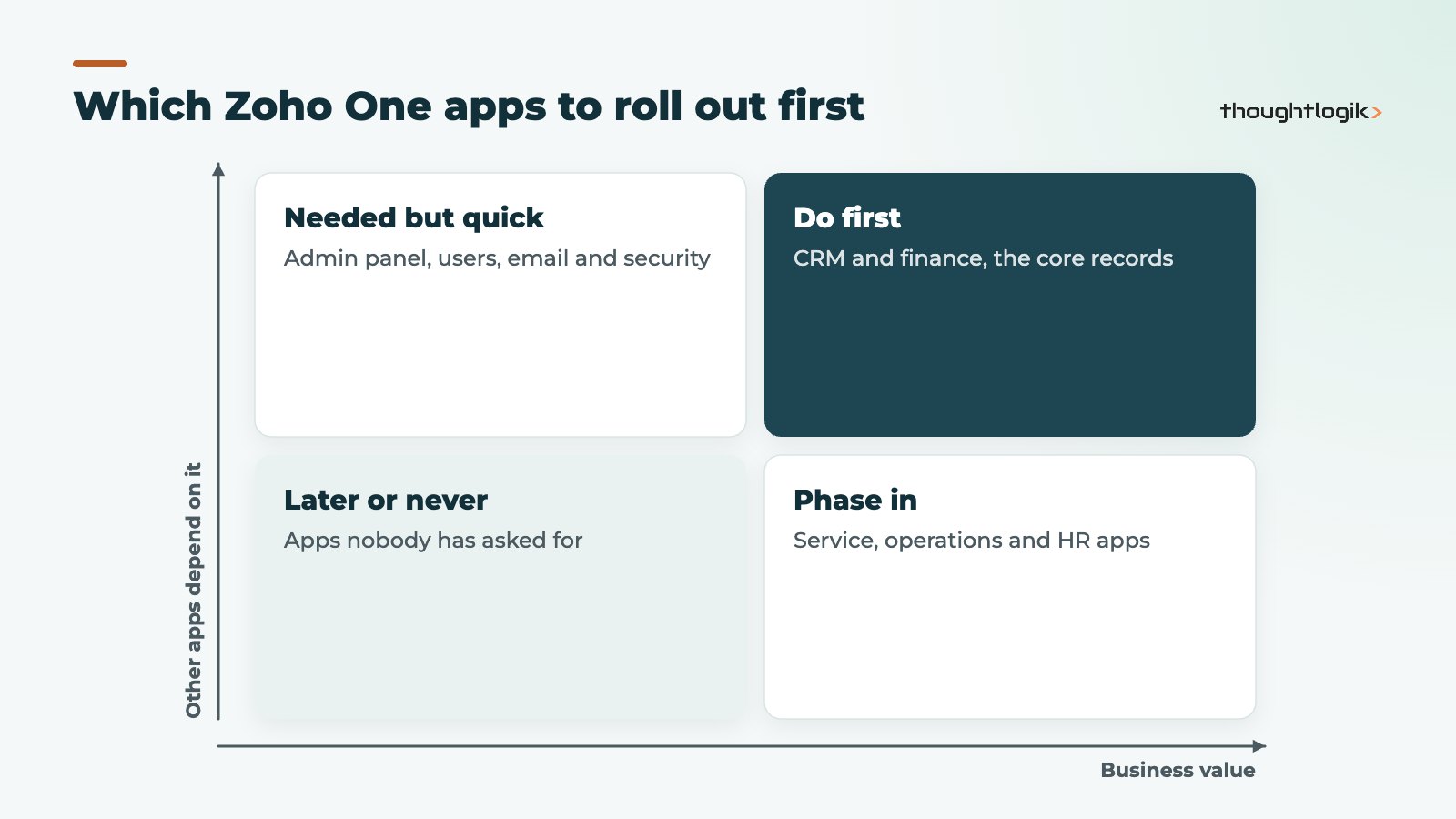
- CRM and finance usually come first because other apps rely on their customer and product records.
- Each phase should go live and settle before the next starts.
- Analytics and automation deliver most when the underlying data is already clean.
Zoho One is attractive because it offers so much for one subscription: CRM, finance, service desk, HR, projects, inventory, analytics and more. That breadth is also its main risk. Businesses switch on everything in the first month, staff are overwhelmed, data ends up duplicated between apps, and a year later they are using three apps badly. A clear implementation roadmap avoids this. This guide sets out the order we recommend for a Zoho One rollout at a typical UK SME.
Why does the order of a Zoho One implementation matter?
Zoho One apps share data. Customers created in CRM appear in Books; products flow between CRM, Books and Inventory; users defined once in the admin panel sign in to every app. Roll apps out in the wrong order and you create the same records twice, then spend months reconciling them. Roll out too many at once and nobody learns any of them properly.
A phased Zoho One implementation lets each app settle, gives staff time to adopt it, and means every new app lands on clean, shared data.
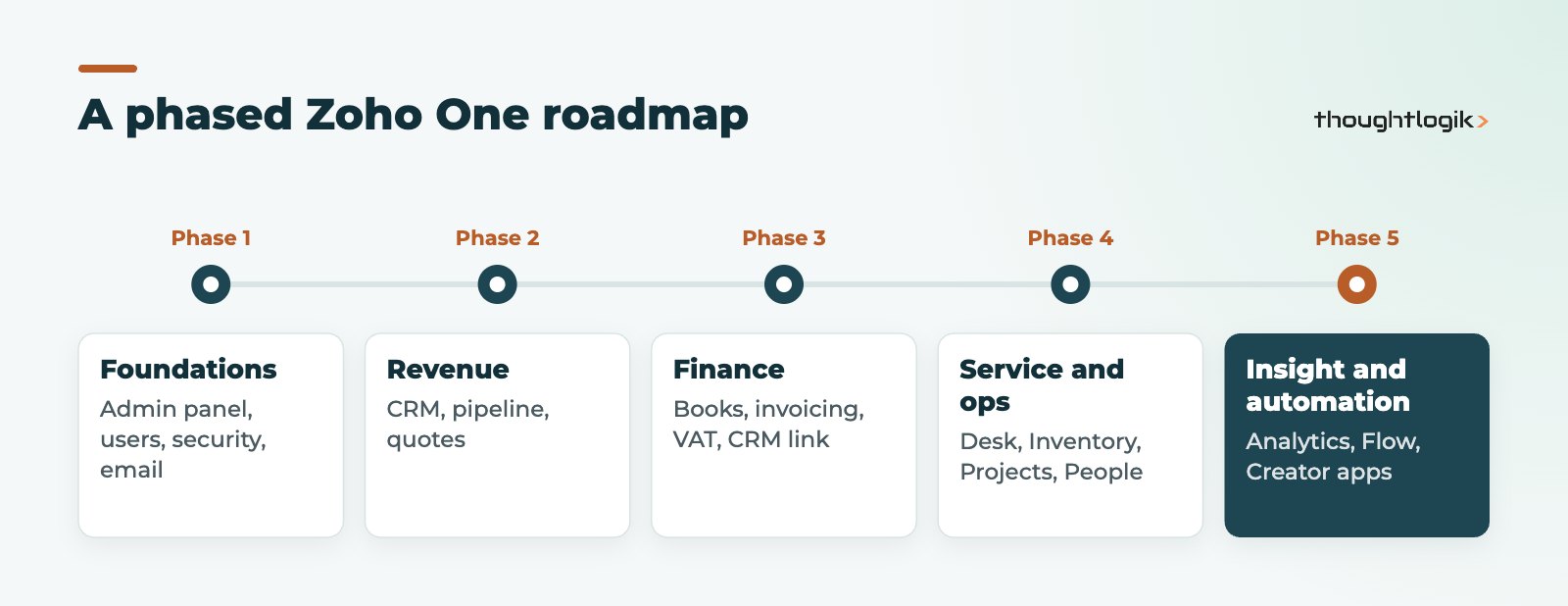
A Zoho One implementation roadmap in five phases
Phase 1: foundations in the admin panel
Everything starts in the Zoho One admin panel. Zoho describes it as the place to manage users and assign apps, apply company-wide security policies such as mandatory multi-factor authentication and password strength, and delegate admin rights to department managers. It can also sync users from Active Directory. Zoho’s Zoho One admin panel overview summarises the options.
- Verify your domain and set up users, departments and groups.
- Set security policies before anyone logs in.
- Decide who gets which apps, using conditional assignment for new starters.
- Set up email, whether Zoho Mail or your existing provider.
Phase 2: the revenue core with Zoho CRM
For most businesses, customers and pipeline come first. Build Zoho CRM around your sales process: modules, fields, pipelines, automation and email integration. Our Zoho CRM implementation checklist covers this phase in detail, and our guide on how to migrate Excel to Zoho CRM helps if your data lives in spreadsheets.
Phase 3: finance with Zoho Books
Next, connect sales to money. Zoho Books handles invoicing, bank feeds, VAT and Making Tax Digital for VAT. Decide which system owns customers and products, set up the CRM and Books link, and agree how quotes become invoices. See our guide to Zoho Books and Making Tax Digital.
Phase 4: service, operations and people
With customers and finance in place, add the apps your operation needs. These can often run in parallel if different teams own them:
- Zoho Desk for customer support tickets, linked to CRM contacts.
- Zoho Inventory for stock, orders and warehouses, linked to Books.
- Zoho Projects for delivery work and time tracking.
- Zoho People for HR records, leave and attendance.
Phase 5: insight and automation
Zoho Analytics, Zoho Flow and Zoho Creator deliver most when the core apps hold good data. Build cross-app dashboards, automate hand-offs between apps and systems, and create custom apps for processes no standard app covers.
How to choose which Zoho One apps come first
The five phases are a default, not a rule. A service business drowning in support emails might start with Desk. A distributor with stock problems might bring Inventory forward. Use two questions to decide: how much value will this app deliver, and how many other apps depend on its data?
| If your biggest problem is | Consider starting with |
|---|---|
| Lost leads and no pipeline view | Zoho CRM |
| Slow invoicing or VAT admin | Zoho Books |
| Customer emails going unanswered | Zoho Desk |
| Stock errors and overselling | Zoho Inventory with Books |
| HR records in spreadsheets | Zoho People |
Whatever you start with, set up the admin panel first. It is quick, and every app depends on it. Then write down which app owns each type of record, such as customers, products, employees and suppliers, so later phases connect to the right source instead of creating their own copies.
Who should run a Zoho One implementation?
A Zoho One implementation touches every department, so it needs more than an enthusiastic administrator. The projects that go well share a few roles:
- An executive sponsor who sets priorities and settles disagreements between teams.
- A project owner with time set aside to make decisions each week.
- App champions in sales, finance, service and HR who test changes and support colleagues.
- A Zoho administrator who will own the system after go-live.
- A partner, if you use one, to design, configure and transfer knowledge rather than keep it.
Review the roadmap at the end of every phase. Priorities change, and the second half of a Zoho One implementation often looks different once the first apps are live and people see what is possible.
Common Zoho One rollout mistakes
- Everything at once. Staff learn nothing well, and support requests pile up.
- No data owner. Decide which app is the master for customers, products and employees.
- Copying old processes. Moving a broken spreadsheet process into Zoho just gives you a broken Zoho process.
- Skipping training. Each phase needs short, role-specific training and a named champion.
- Ignoring licences. Plan how employees and flexible users are licensed; see Zoho pricing in the UK for the options.
Still deciding between Zoho One and a narrower bundle? Read Zoho One vs Zoho CRM Plus.
How ThoughtLogik helps
ThoughtLogik is a UK Zoho Premium Partner delivering Zoho One implementation projects from Northampton and our delivery team in Coimbatore.
- Discovery workshops to build your implementation roadmap and phase plan.
- Admin panel, security and user set-up done properly from day one.
- Phased configuration, data migration and training for each app.
- Ongoing support as you add more apps; see our Zoho One services.
Frequently asked questions
How long does a Zoho One implementation take?
It depends on how many apps you roll out, how complex your processes are and how much data you migrate. A phased approach means the first apps go live well before the full roadmap is complete.
Do we have to use every Zoho One app?
No. Zoho One includes more than 40 apps, but you only need the ones that solve real problems. Unused apps can simply stay unassigned.
Should we start with Zoho CRM or Zoho Books?
Most businesses start with CRM because customer records and pipeline feed everything else, then add Books. If invoicing or VAT is your biggest pain, starting with Books can make sense, provided you plan the CRM link from the outset.
What should be done in the Zoho One admin panel first?
Verify your domain, create users, departments and groups, set security policies such as multi-factor authentication, and decide which apps each group receives. Do this before rolling out any business app.
Can we run phases in parallel?
Yes, where different teams own different apps and the apps do not depend on each other’s data. For example, Zoho People and Zoho Desk can often be rolled out alongside each other.
Planning a Zoho One rollout? We can build a phased roadmap that fits how your business works. Book a free consultation or see our Zoho implementation approach.