Short answer
Odoo Maintenance is the app for recording your equipment, organising maintenance teams and managing corrective and preventive maintenance requests in one place. It calculates reliability measures such as MTBF and MTTR from your repair history, links equipment to manufacturing work centres, and gives planners a calendar of upcoming work.
Key takeaways
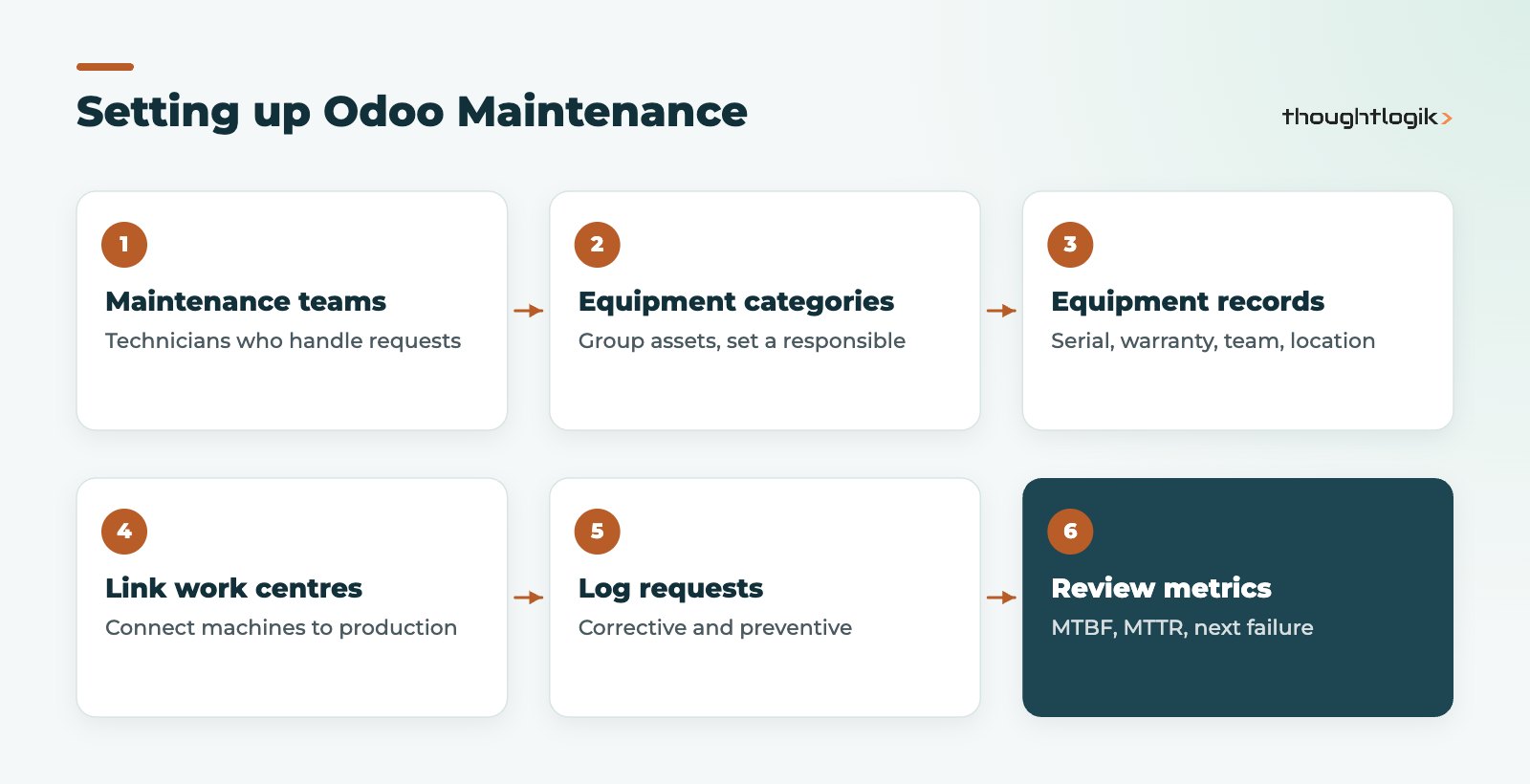
- Structure first: maintenance teams, equipment categories, then equipment records.
- Maintenance requests are either corrective (fixing a fault) or preventive (planned).
- MTBF is calculated from completed corrective maintenance, so log every breakdown.
- Link equipment to work centres so maintenance and production plans line up.
- The calendar and kanban views show technicians’ workload and request status.
In many small manufacturers and service businesses, equipment maintenance lives in a mix of whiteboards, engineers’ notebooks and memory. That works until a key machine fails at the worst moment and nobody can say when it was last serviced. Odoo Maintenance gives you a single register of equipment and a structured way to plan and record the work done on it. This guide covers how the app is structured, how requests and preventive plans work, and how to get useful reliability data out of it without creating admin for your engineers.
What does Odoo Maintenance include?
The app has four building blocks:
- Maintenance teams made up of technicians who pick up requests.
- Equipment categories such as “CNC machines”, “Vehicles” or “IT hardware”, each with a responsible person.
- Equipment records, often called machines and tools, holding details for each asset.
- Maintenance requests for the work itself, corrective or preventive.
The Odoo Maintenance setup documentation describes equipment records holding the category, who uses it (a department, an employee or other), the assigned team and technician, plus product information such as vendor, model, serial number, cost and warranty expiration date. That last field alone saves many businesses from paying for repairs that should have been covered.
How do maintenance requests work in Odoo?
Every piece of work is a request. Each request records the equipment or work centre, the maintenance type, the team and responsible technician, a scheduled date and expected duration, a priority and notes. In manufacturing, a request can reference the manufacturing order or work order where a problem appeared.
Requests move through stages on a kanban board. By default these are New Request, Repaired and Scrap, the last for equipment that cannot be repaired. You can add stages to match your workflow, for example “Waiting for parts”. If you enable custom maintenance worksheets, technicians can complete a structured worksheet as part of the request, and instructions can be attached as a PDF, a link to slides or text.
Corrective versus preventive maintenance requests
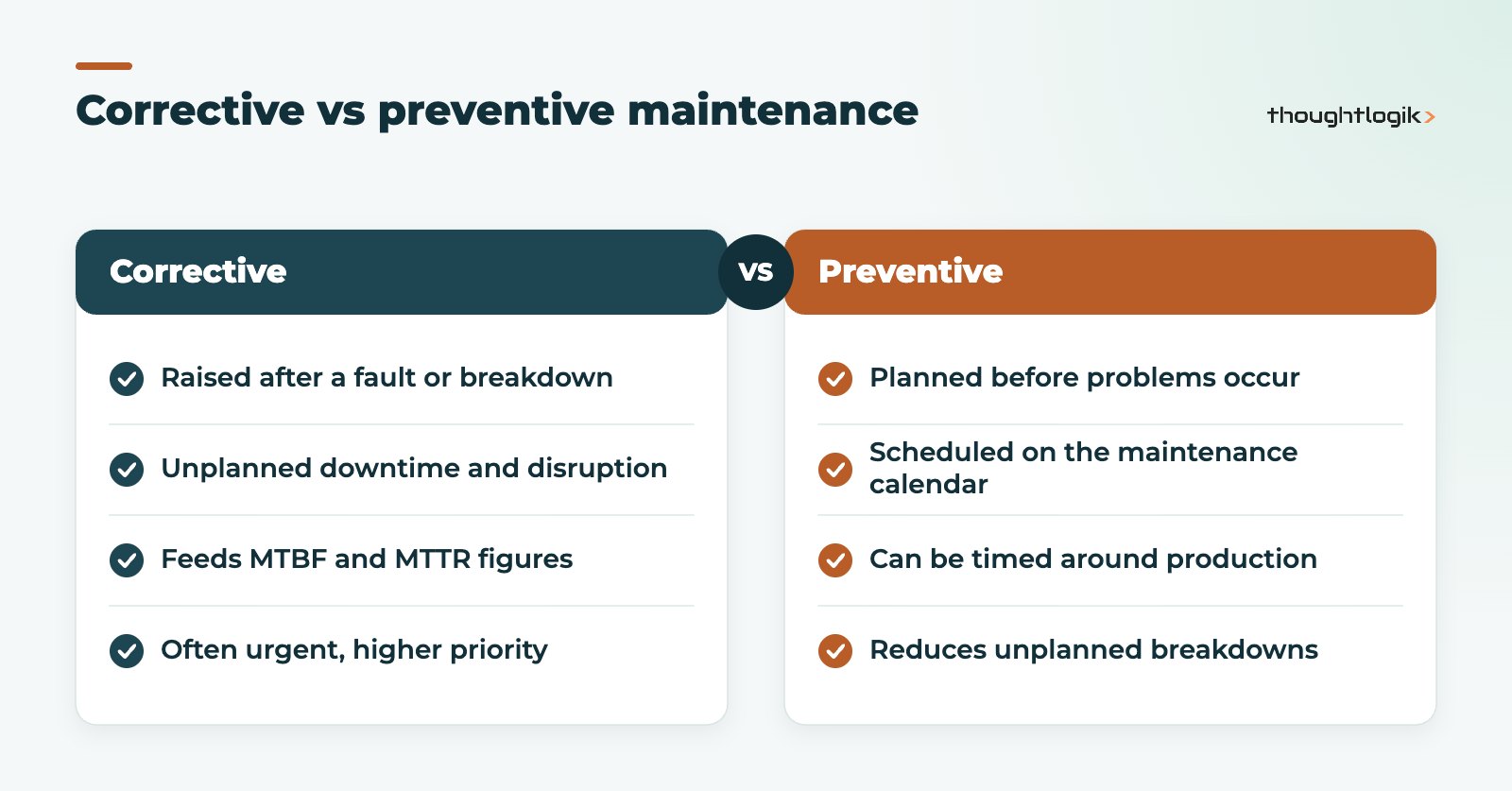
Corrective requests fix something that has already gone wrong. Preventive maintenance is planned in advance to stop failures happening. Both use the same request form; the maintenance type field tells Odoo which is which, and that distinction matters for the reliability figures below.
Planning preventive maintenance in Odoo Maintenance
Preventive requests are scheduled on the maintenance calendar, which shows work by day, week, month or year with technicians listed alongside. Planners can see at a glance who is busy and when, and move work to fit around production. Kanban, list, pivot and graph views help managers review open requests, hours spent and workload by team.
A practical preventive maintenance plan usually starts with:
- Manufacturer service intervals for critical equipment.
- Statutory inspections that must happen on time, such as lifting equipment or pressure systems, with evidence retained.
- Routine checks agreed with operators, such as lubrication and cleaning.
- Items your breakdown history shows fail repeatedly.
How does Odoo calculate MTBF and MTTR?
Each equipment record shows several reliability measures:
| Measure | What it means | Where it comes from |
|---|---|---|
| MTBF | Mean time between failures | Calculated from completed corrective maintenance requests |
| MTTR | Mean time to repair | Calculated from how long repairs take |
| Expected MTBF | Your own expectation for the asset | Entered manually |
| Estimated next failure | When the next failure is likely | Latest failure date plus MTBF |
These figures are only as good as your data. If breakdowns are fixed without a request being logged, MTBF will look better than reality. Make logging a corrective request a habit, even for quick fixes.
Linking equipment maintenance to manufacturing
If you use Odoo Manufacturing, equipment can be linked to work centres, and the work centre view shows each machine’s technicians, category and reliability figures. That link lets production planners see planned maintenance alongside manufacturing orders, and lets operators raise a request from the context of the work they are doing. Our Odoo MRP manufacturing guide explains work centres in more detail.
Can Odoo Maintenance be used outside manufacturing?
Yes. Equipment can be assigned to departments or employees, so the same app suits vehicles, IT hardware, building plant or catering equipment. If your technicians work at customer sites rather than on your own assets, Odoo Field Service is usually the better fit.
Using Odoo Maintenance records as evidence
For UK businesses, equipment maintenance is not only about uptime. Health and safety law expects work equipment to be maintained in a safe condition, and some equipment, such as lifting equipment, needs periodic thorough examination by a competent person. The Health and Safety Executive publishes guidance on what applies to your equipment, and your safety adviser should confirm your obligations. Odoo does not decide those obligations for you, but it is a sensible place to keep the evidence that the work was planned and done.
In practice that means:
- Recording statutory inspections as preventive requests with scheduled dates, so nothing slips past its due date unnoticed.
- Attaching inspection reports and certificates to the request or equipment record.
- Using request stages to show whether work is planned, in progress, done or waiting for parts.
- Keeping a responsible person on each equipment category so there is always an owner.
When an insurer, auditor or customer asks for maintenance history on a particular machine, the answer is one click away rather than a search through folders. Managers who want this on a single screen can build filtered views or dashboards; our guide to Odoo reporting and dashboards covers the options, and our Odoo implementation page explains how we phase projects that add maintenance alongside other apps.
Getting value from Odoo Maintenance quickly
- Register critical equipment first, not every asset you own.
- Log every breakdown as a corrective request from day one.
- Put known service intervals on the calendar as preventive requests.
- Review reliability figures and repeat failures monthly and adjust the plan.
Quality problems are often the first sign of equipment wear, so it is worth connecting maintenance with inspections; our Odoo Quality guide shows how quality alerts capture root causes.
How ThoughtLogik helps
We set up Odoo Maintenance as part of wider manufacturing and operations projects, starting with the equipment that matters most to your output.
- Equipment register import, including serial numbers and warranty dates
- Maintenance teams, categories and request stages that fit your workflow
- Preventive maintenance calendar built from service intervals
- Dashboards for MTBF, repeat failures and technician workload
Frequently asked questions
What is the difference between MTBF and MTTR in Odoo?
MTBF is the average time between failures, calculated from completed corrective requests. MTTR is the average time taken to repair. Together they show how often an asset fails and how long it is out of action.
Can operators raise maintenance requests?
Yes. Users can create maintenance requests for equipment or work centres, and in manufacturing they can reference the order or work order where the issue appeared.
Does Odoo Maintenance track spare parts?
Parts stock is managed in Odoo Inventory. How parts consumption links to maintenance requests depends on your version and setup, so plan this during design.
Is equipment maintenance history kept on each asset?
Yes. Each equipment record links to its maintenance requests, giving a full history of corrective and preventive work.
Tired of firefighting breakdowns? We will help you plan maintenance before machines fail. Book a free consultation or see our manufacturing solutions.