
Short answer
Odoo landed costs let you add freight, import duty, insurance and clearance charges to the value of stock you have received, so product costs and margins reflect what the goods really cost to get into your warehouse. You record the extra costs as landed cost products, link them to the relevant receipts, choose how to split them, and Odoo adjusts the stock valuation.
Key takeaways
- Landed costs need products in categories using FIFO or AVCO costing.
- Landed cost products are Service products with the Is a Landed Cost option ticked.
- Choose a split method per cost: equal, by quantity, by current cost, by weight or by volume.
- Import duty is part of the landed cost; recoverable import VAT normally is not.
- Apply landed costs promptly after receipt so margins on sales are accurate.
If you import goods, the supplier’s invoice is only part of the story. Shipping, insurance, customs duty and broker fees can add a meaningful amount to every unit, and if they sit in overheads instead of stock value, your gross margins look better than they are. Odoo landed costs fix that by spreading those charges across the products they relate to.
What are Odoo landed costs?
A landed cost is the total cost of getting a product into your warehouse and ready to sell. In Odoo, it is a record that takes one or more additional charges, links them to one or more stock receipts, and updates the inventory valuation of the products on those receipts.
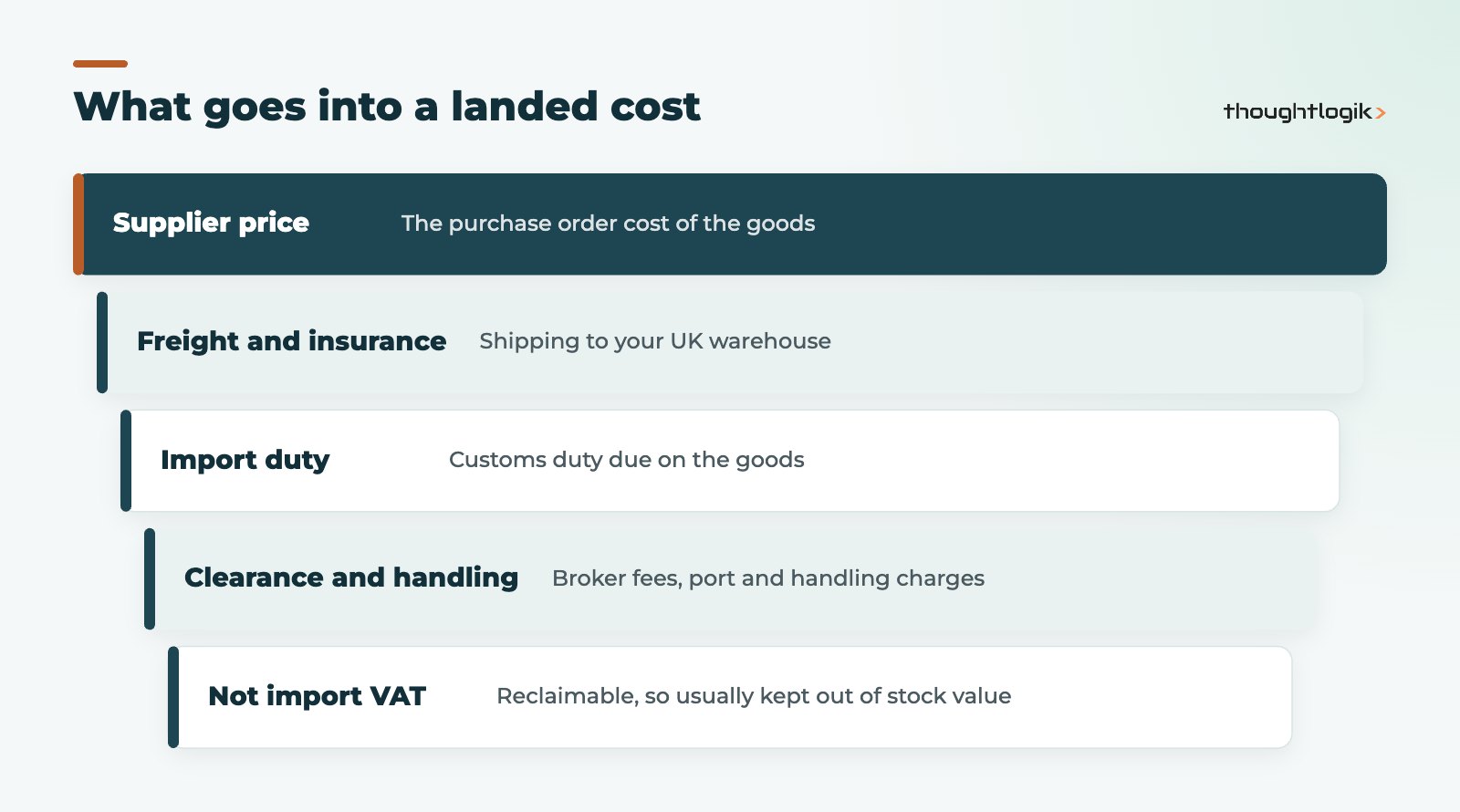
For UK importers the usual components are:
- Freight costs for sea, air or road transport, including any insurance.
- Import duty payable to HMRC on goods from outside the UK.
- Clearance and handling: customs broker fees, port charges, demurrage and delivery to your site.
Should import VAT be included in landed costs?
Normally, no. VAT-registered businesses can reclaim import VAT, and many use postponed VAT accounting to declare and recover it on the same VAT return. Because it is recoverable, it is not a cost of the stock. Duty is different: it is a genuine cost and belongs in the landed cost. Note also that HMRC calculates the VAT value of imports on the customs value plus duty and incidental costs such as transport and insurance to the first UK destination, as explained in the GOV.UK guidance on the VAT value of imports. Your accountant should confirm the treatment for your business, especially if you are not fully VAT-recoverable.
How do you set up Odoo landed costs?
Setting up Odoo landed costs is short, but two decisions matter: costing method and split method.
- Enable the feature. In the Inventory settings, turn on Landed Costs in the valuation section and choose a default journal for the entries.
- Check costing methods. According to the Odoo landed costs documentation, the products on the original purchase order must belong to a product category using FIFO or AVCO costing. Standard price categories do not take landed cost adjustments.
- Create landed cost products. Create a Service product for each type of charge (for example “Sea freight”, “Import duty”, “Broker fee”), tick Is a Landed Cost on the purchase tab and set a default split method.
- Map accounts. Make sure the expense or clearing accounts on these products suit how your accountant wants duty and freight recorded.
Which split method should you use?
The split method on Odoo landed costs decides how a charge is shared between the products on a receipt. Odoo offers five options:
| Split method | How it allocates | Good fit for |
|---|---|---|
| Equal | The same amount to each product line | Small fixed fees on simple receipts |
| By Quantity | Per unit received | Similar-sized units in one shipment |
| By Current Cost | In proportion to each line’s cost | Import duty on goods at similar duty rates |
| By Weight | In proportion to product weight | Freight charged on weight |
| By Volume | In proportion to product volume | Container or pallet freight |
By Weight and By Volume only work if product weights and volumes are maintained, so fix your product data first before relying on them. Where products on one shipment carry very different duty rates, allocating it by value may not match the customs entry; in that case, record duty lines per commodity code or adjust the allocation manually before validating.
Applying landed costs to a shipment
In day-to-day use, the process usually starts when the freight forwarder or broker invoice arrives.
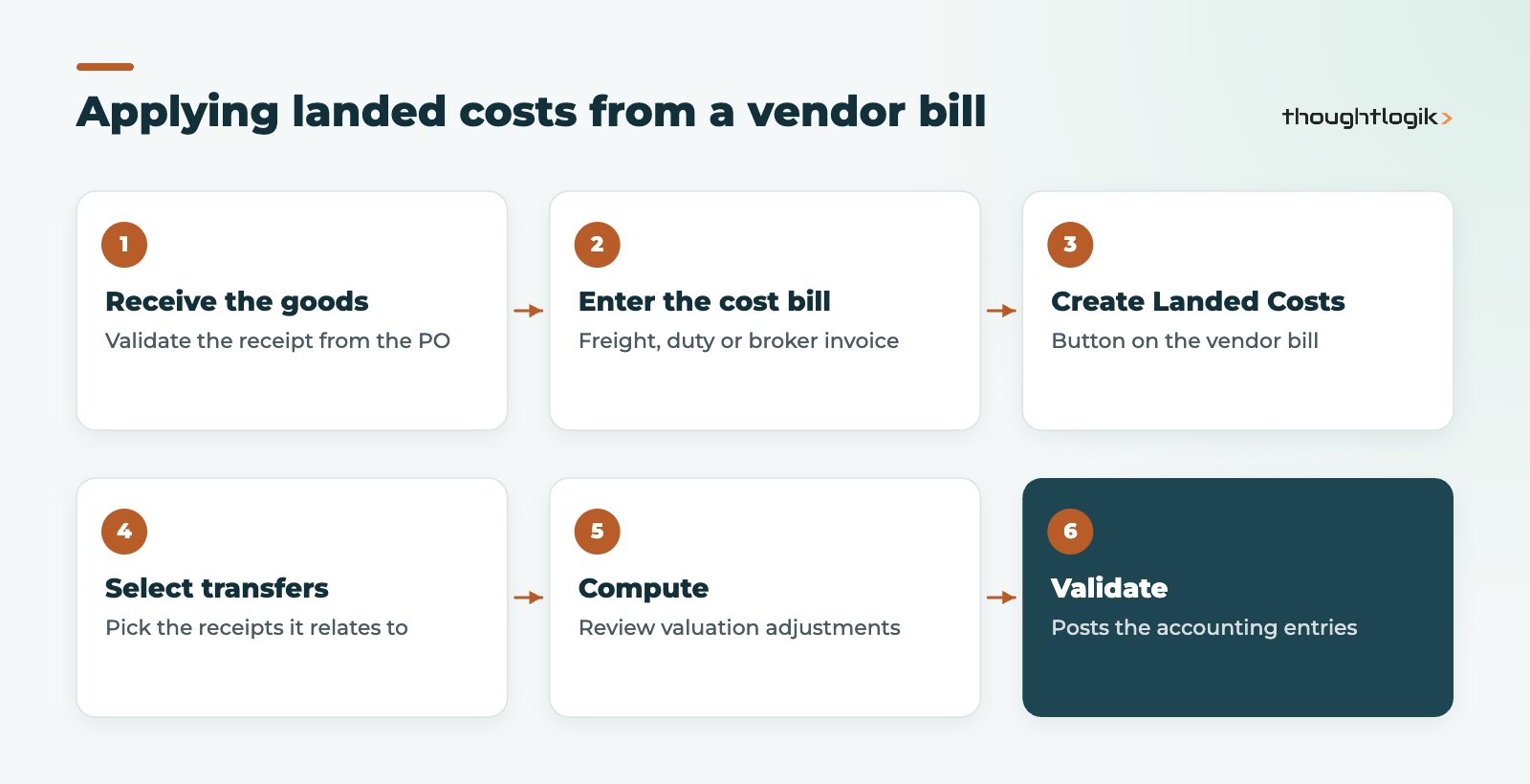
Enter the vendor bill with the landed cost product on the line, click Create Landed Costs, select the receipt or receipts the charge relates to, then click Compute. The Valuation Adjustments tab shows how much each product line receives. Check it, then Validate to post the entries. One broker bill can cover several receipts, and one receipt can take several landed cost records as bills arrive.
What happens if stock has already been sold?
Timing matters. If a container is received, partly sold, and the duty bill arrives weeks later, some of the extra cost relates to goods that have already left. The cleanest approach is to process freight and duty as soon as the bills arrive, and to agree with your finance team how late charges are handled at month end. For fast-moving goods, some businesses use estimated landed costs at receipt and true them up later.
Reporting on margins after Odoo landed costs
Once landed costs are validated, the extra cost flows into the product’s valuation and, as stock is sold, into cost of goods sold. That means your sales margin reports start to show the real contribution of each product, supplier and shipping route. A UK distributor importing from several countries can compare, for example, whether a cheaper overseas supplier is still cheaper once sea freight and duty are included. The same data helps buyers decide when to consolidate shipments, and helps finance explain movements in gross margin month to month. If you want this analysis on a dashboard rather than in exports, see our guide to Odoo reporting and dashboards.
Common Odoo landed costs mistakes
- Products in Standard price categories, so the landed cost cannot adjust their value.
- Import VAT added to stock value, inflating cost and double counting the reclaim.
- Weight-based allocation used when weights are blank on product records.
- Landed costs never processed, leaving freight and duty sitting in overheads.
- No reconciliation between the duty in Odoo landed costs and the duty on HMRC statements.
Accurate landed costs also depend on accurate receipts and stock records; our guide to Odoo inventory accuracy covers the basics, and our Odoo purchase management guide explains the purchase-to-receipt flow that landed costs build on.
How ThoughtLogik helps
We set up landed costs as part of a joined-up purchase, inventory and accounting design, so that the numbers match what your accountant expects.
- Costing method and product category review before go-live
- Landed cost products, split methods and account mapping for your import routes
- Reporting that shows margin after freight costs and import duty
- Links with our Odoo accounting setup for UK businesses and inventory management configuration
Frequently asked questions
Do Odoo landed costs work with standard costing?
No. The products on the receipt need to be in a product category using FIFO or AVCO costing for landed costs to adjust their valuation.
Can one freight bill cover several purchase orders?
Yes. When you create landed costs from a bill, you can select several receipts, and the charge is split across the products on all of them using the chosen split method.
Is import duty part of inventory valuation?
Yes, import duty is a cost of getting goods into stock, so it belongs in the landed cost and therefore in inventory valuation. Recoverable import VAT normally does not.
Can I set a different split method per charge?
Yes. Each landed cost product has a default split method, and you can change the method on the individual landed cost lines before computing.
Importing stock and unsure of your real margins? We will set up landed costs that reflect every pound spent getting goods to your shelves. Book a free consultation or see our wholesale and distribution solutions.





