Short answer
The Zoho CRM API is a REST API secured with OAuth 2.0 that lets your other systems read and write CRM records, run queries and react to changes. Usage is measured in API credits over a rolling 24-hour window, with limits on concurrent calls, both scaling with your edition and licences. For real-time integration you can push changes out with workflow webhooks or the Notification API rather than polling.
Key takeaways
- Authentication uses OAuth 2.0: access tokens last an hour, refresh tokens last until revoked.
- Always call the accounts and API domains for your data centre, for example the EU domains.
- API credits run on a rolling 24-hour window and depend on edition and user licences.
- Concurrency limits return TOO_MANY_REQUESTS errors, so integrations need queuing and retries.
- Webhooks and the Notification API avoid wasteful polling for changes.
Most Zoho CRM projects reach a point where CRM needs to talk to something else: an ERP, an ecommerce platform, a finance system or a data warehouse. The Zoho CRM API makes that possible, but the design decisions made at the start decide whether the integration is reliable or a source of weekly firefighting. This guide is written for directors, finance and operations leads and IT teams who need to understand the moving parts before commissioning the work.
What is the Zoho CRM API?
The Zoho CRM API is a versioned REST API. It exposes records in standard and custom modules, plus metadata, users, territories, bulk operations and query endpoints. Integrations send JSON over HTTPS and receive JSON back. Zoho publishes full reference documentation in its Zoho CRM API developer guide.
One detail that trips up UK projects is the data centre. Zoho runs separate data centres, and your organisation’s data lives in one of them. An account on the EU data centre authenticates at accounts.zoho.eu and calls www.zohoapis.eu, not the .com domains. Using the wrong domain produces confusing authentication errors, so confirm your data centre first.
How does OAuth 2.0 authentication work?
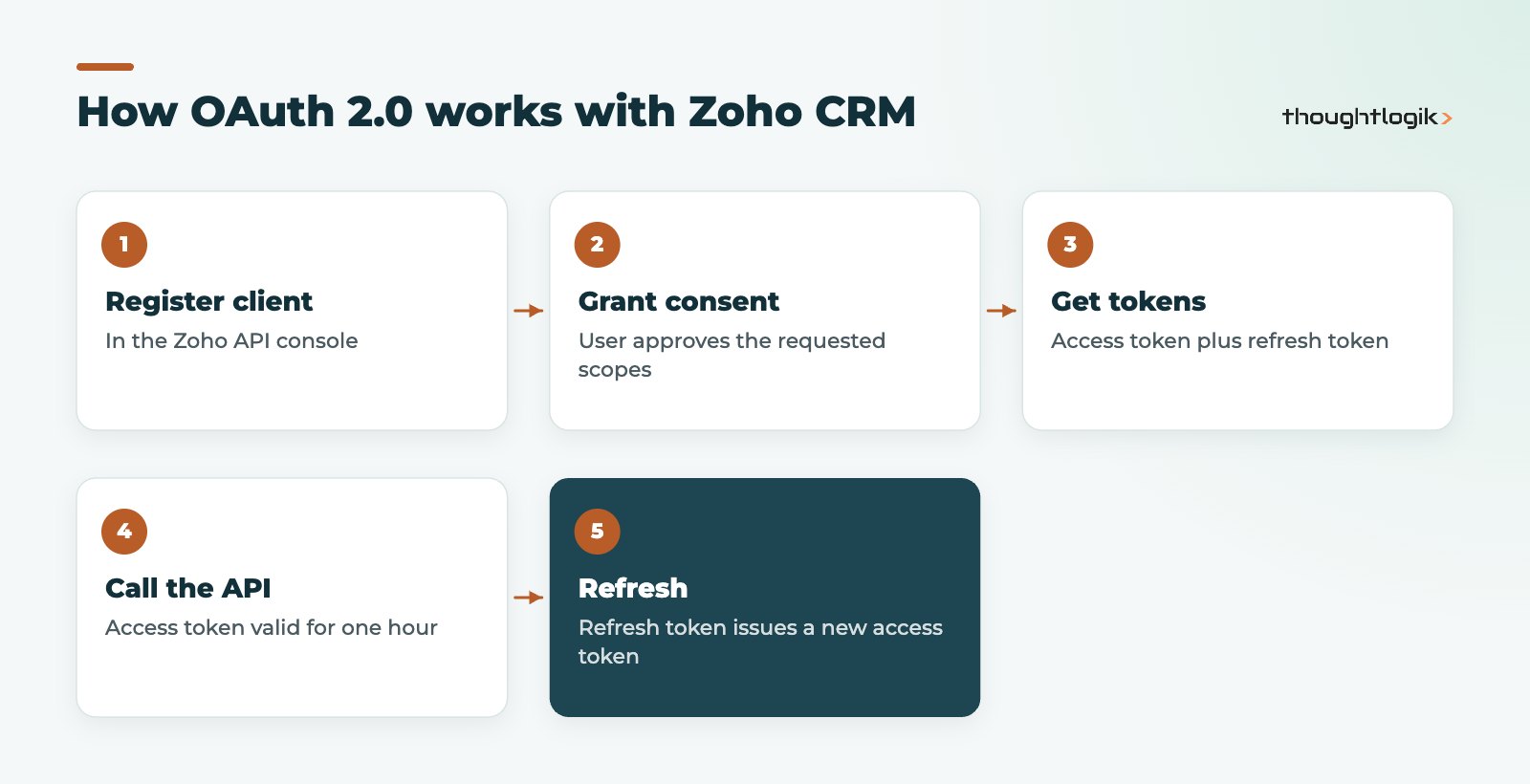
Zoho uses OAuth 2.0 so that integrations never store user passwords. You register a client, a user grants consent for specific scopes, and the integration receives an access token and a refresh token. The access token is valid for one hour. The refresh token has no expiry until it is revoked, and is used to obtain new access tokens.
OAuth 2.0 decisions for IT teams
- Which user? API calls act with the permissions of the user who granted consent. Use a dedicated integration user with a profile limited to what the integration needs, not a director’s account.
- Which scopes? Request the narrowest scopes that work. Read-only integrations should not hold write scopes.
- Where are tokens stored? Zoho is clear that tokens must stay confidential. Keep them in a secrets store, never in client-side code or repositories.
Zoho CRM API limits: credits and concurrency
Zoho measures usage in API credits over a rolling 24-hour window from the start of each call. The allowance is a base amount plus credits per user licence, with higher allowances on higher editions and an overall ceiling on lower ones. Extra API credits can be added on a pay-as-you-go basis if you consistently exceed your allowance.
Separately, concurrency limits cap how many calls one app can have in progress at the same time, again rising by edition. Resource-intensive operations such as lead conversion, bulk inserts and updates, sending mail and query calls also have a sub-concurrency limit. Exceed either and the API returns a TOO_MANY_REQUESTS error.
| Constraint | What it means | Design response |
|---|---|---|
| API credits | Daily volume on a rolling 24-hour window | Batch records, avoid polling, use bulk APIs for large loads |
| Concurrency | Simultaneous calls per app | Queue requests and retry with back-off |
| Sub-concurrency | Tighter cap on heavy operations | Serialise conversions, bulk writes and queries |
| Token expiry | Access tokens last one hour | Refresh automatically before expiry |
Exact figures vary by edition and change over time, so check the current limits page and our Zoho CRM editions comparison when sizing an integration.
Webhooks, the Notification API and real-time sync
Polling the API every few minutes to ask “has anything changed?” wastes API credits and still lags behind. Zoho CRM offers two push options.
Workflow webhooks
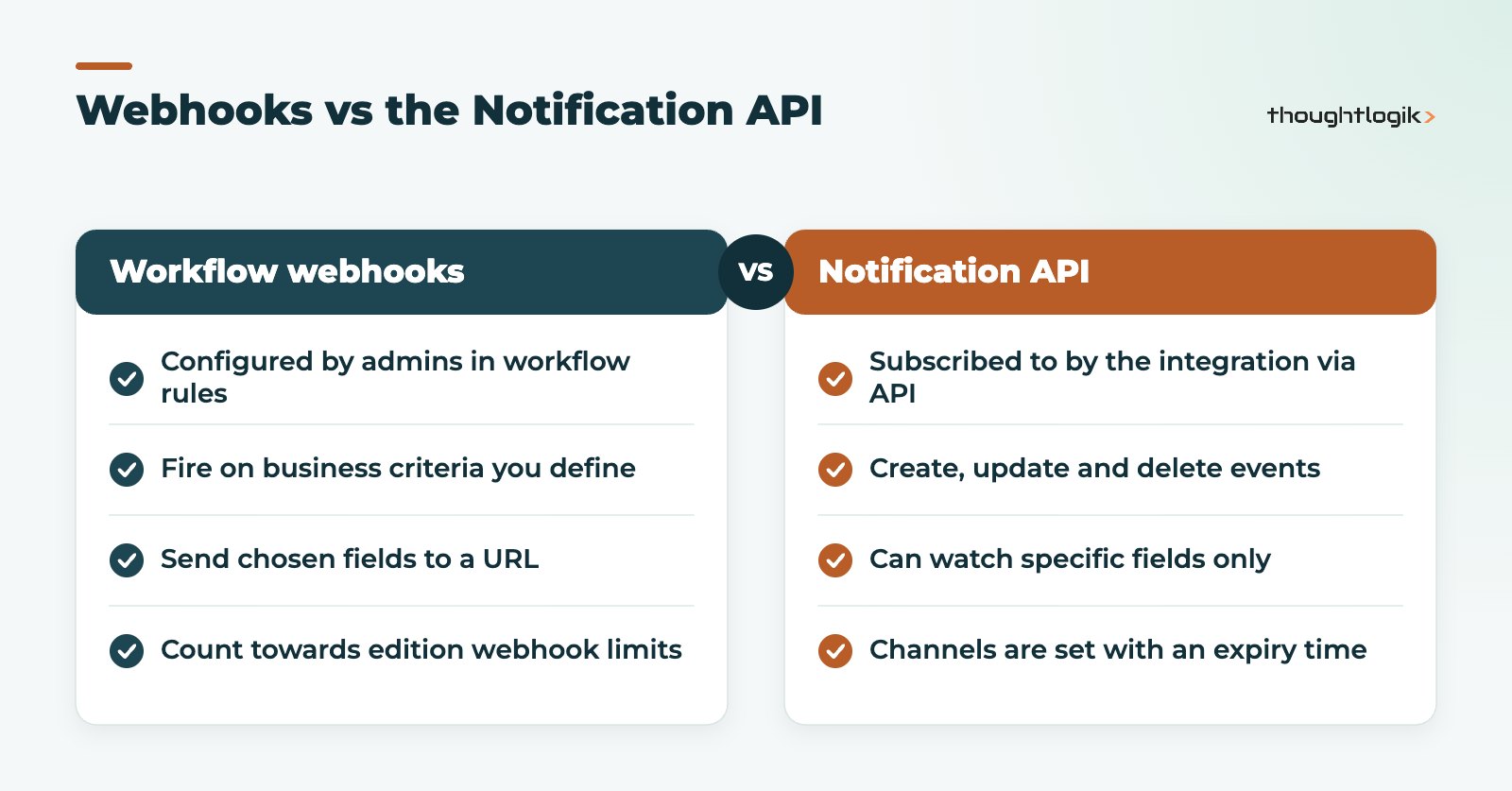
Webhooks are configured by an administrator as an action on a workflow rule. When a record meets the rule’s criteria, CRM sends the fields you choose to an external URL. They suit business events such as “deal won, send to ERP”. Each edition has daily webhook limits, and each workflow action can hold one webhook.
Notification API
The Notification API lets the integration itself subscribe to create, update and delete events on a module, optionally only when specific fields change, such as a deal’s stage. Each channel is set with an expiry time, so your integration must renew subscriptions. It suits data synchronisation where the external system needs to mirror CRM.
Designing a reliable Zoho CRM integration
- Define the system of record for each entity (customers, products, prices, invoices) so two systems never fight over the same field.
- Use stable external IDs to match records rather than names or email addresses.
- Control automation. Record insert and update calls accept a trigger parameter: omit it and applicable workflows, approvals and blueprints run; pass an empty list and they are skipped. Decide deliberately which you want.
- Log and alert. Every failed call should be logged with the payload and raise an alert someone will read.
- Consider alternatives. Not every Zoho CRM integration needs custom code. Zoho Flow, native Zoho integrations and Deluge custom functions cover many cases. Our Zoho Flow vs Zapier comparison helps when choosing.
Questions to ask before commissioning a Zoho CRM API project
Decision makers do not need to read the API reference, but they should get clear answers to a handful of questions from whoever builds the integration:
- Which system owns each piece of data, and what happens when both change the same record?
- How many records move per day, and how does that compare with our API credits at our edition and licence count?
- What happens when Zoho or the other system is unavailable for an hour? Are changes queued and replayed?
- Who is alerted when a sync fails, and how quickly?
- Where are OAuth 2.0 tokens stored, and who can access them?
- How will the integration be tested in a sandbox before it touches live data? Our Zoho CRM sandbox guide explains the options.
Vague answers to these questions are the most reliable predictor of an integration that will need rework.
How ThoughtLogik helps
ThoughtLogik designs and builds integrations on the Zoho CRM API for UK businesses, including our own CRM extensions for Companies House, Creditsafe and UK postcode lookup.
- Integration architecture: system of record, data mapping and error handling.
- API credit and concurrency sizing before you commit to an edition.
- Build, testing and monitoring through our Zoho integrations service.
- Reviews of existing integrations that hit limits or fail silently.
Frequently asked questions
Is there a cost to use the Zoho CRM API?
API access is included with Zoho CRM editions within your API credit allowance. Additional credits can be purchased on a pay-as-you-go basis. See our Zoho pricing UK page for licensing.
How long does a Zoho CRM access token last?
An access token is valid for one hour. The refresh token lasts until it is revoked and is used to obtain new access tokens without the user signing in again.
What happens if we exceed API limits?
If you exceed your credit allowance or concurrency limits, calls are rejected. Concurrency breaches return a TOO_MANY_REQUESTS error, so integrations should queue and retry.
Should we use webhooks or the Notification API?
Use workflow webhooks for business events that admins define, such as a deal being won. Use the Notification API when an external system needs to track all changes to a module or specific fields.
Do records created through the Zoho CRM API trigger workflows?
By default, applicable automation runs. The trigger parameter lets you choose which automations to run, or skip them entirely by passing an empty list.
Connecting Zoho CRM to your other systems? We can design an integration that stays within limits and fails loudly, not silently. Book a free consultation or see our Zoho custom development services.